VAcc
The VAcc indicator, which was introduced in the article “VAcc: A Momentum Indicator Based On Velocity And Acceleration” by Scott Cong in the September 2023 issue of S&C, is available for download at the following link for NinjaTrader 8:
Once the file is downloaded, you can import the indicator into NinjaTrader 8 from within the control center by selecting Tools → Import → NinjaScript Add-On and then selecting the downloaded file for NinjaTrader 8.
You can review the indicator source code in NinjaTrader 8 by selecting the menu New → NinjaScript Editor → Indicators folder from within the control center window and selecting the file.
Re: TASC magazine indicators
12The Points & Line Chart
NinjaTrader: November 2025
In the article “The Points & Line Chart” in this issue, Mohamed Ashraf and Mohamed Meregy present a chart style they named the points & line (P&L) chart.
A file has been created to help the user implement several of the possible configurations in the P&L chart style (the default, ATR, and percent box sizing) and is available for download at the following link for NinjaTrader 8:
Once the file is downloaded, you can import it into NinjaTrader 8 from within the control center by selecting Tools → Import → NinjaScript Add-On and then selecting the downloaded file for NinjaTrader 8.
You can review the source code in NinjaTrader 8 by selecting New → NinjaScript Editor → Indicators from within the control center window and selecting the file.
NinjaTrader: November 2025
In the article “The Points & Line Chart” in this issue, Mohamed Ashraf and Mohamed Meregy present a chart style they named the points & line (P&L) chart.
A file has been created to help the user implement several of the possible configurations in the P&L chart style (the default, ATR, and percent box sizing) and is available for download at the following link for NinjaTrader 8:
Once the file is downloaded, you can import it into NinjaTrader 8 from within the control center by selecting Tools → Import → NinjaScript Add-On and then selecting the downloaded file for NinjaTrader 8.
You can review the source code in NinjaTrader 8 by selecting New → NinjaScript Editor → Indicators from within the control center window and selecting the file.
Re: TASC magazine indicators
13Trading The Channel
NinjaTrader: May 2025
In “Trading The Channel” in this issue, Perry Kaufman discusses several approaches to trading with a channel (trading bands). The technique discussed in the article is available for download at the following link for NinjaTrader 8:
Once the file is downloaded, you can import the file into NinjaTrader 8 from within the control center by selecting Tools → Import → NinjaScript Add-On and then selecting the downloaded file for NinjaTrader 8.
You can review the source code in NinjaTrader 8 by selecting the menu New → NinjaScript Editor → Indicators folder from within the control center window and selecting the file.
NinjaTrader: May 2025
In “Trading The Channel” in this issue, Perry Kaufman discusses several approaches to trading with a channel (trading bands). The technique discussed in the article is available for download at the following link for NinjaTrader 8:
Once the file is downloaded, you can import the file into NinjaTrader 8 from within the control center by selecting Tools → Import → NinjaScript Add-On and then selecting the downloaded file for NinjaTrader 8.
You can review the source code in NinjaTrader 8 by selecting the menu New → NinjaScript Editor → Indicators folder from within the control center window and selecting the file.
- These users thanked the author Banzai for the post:
- mahdinik200
Re: TASC magazine indicators
14You choose the best indicatorsBanzai wrote: Fri Dec 05, 2025 7:05 pm Trading The Channel
NinjaTrader: May 2025
In “Trading The Channel” in this issue, Perry Kaufman discusses several approaches to trading with a channel (trading bands). The technique discussed in the article is available for download at the following link for NinjaTrader 8:
Once the file is downloaded, you can import the file into NinjaTrader 8 from within the control center by selecting Tools → Import → NinjaScript Add-On and then selecting the downloaded file for NinjaTrader 8.
You can review the source code in NinjaTrader 8 by selecting the menu New → NinjaScript Editor → Indicators folder from within the control center window and selecting the file.
 in a parallel world Kaufman wrote this one in mql5
- These users thanked the author mahdinik200 for the post:
- Banzai
Re: TASC magazine indicators for NT8
15One Percent A Week
Links: |TradingView|TradeStation|NinjaTrader|
NinjaTrader: June 2026
In “One Percent A Week: A High-Probability Weekly Trading Strategy For TQQQ, Part 2: Variations And Community Enhancements” in this issue, Dion Kurczek presents some exit variations for the strategy he first presented in his article in the March 2026 issue. Several of the indicators discussed in the article are available for download at the following link for NinjaTrader 8:
Once the file is downloaded, you can import the indicator into NinjaTrader 8 from within the control center by selecting Tools → Import → NinjaScript Add-On and then selecting the downloaded file for NinjaTrader 8.
You can review the indicator source code in NinjaTrader 8 by selecting the menu New → NinjaScript Editor → Indicators folder from within the control center window and selecting the file.
A sample chart is shown in Figure 2.
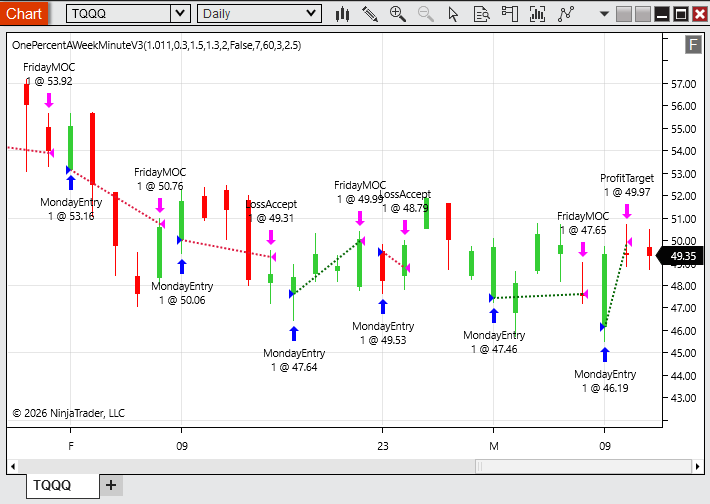 FIGURE 2: NINJATRADER. An example implementation of the trading strategy is demonstrated on a daily chart of TQQQ.
Links: |TradingView|TradeStation|NinjaTrader|
NinjaTrader: June 2026
In “One Percent A Week: A High-Probability Weekly Trading Strategy For TQQQ, Part 2: Variations And Community Enhancements” in this issue, Dion Kurczek presents some exit variations for the strategy he first presented in his article in the March 2026 issue. Several of the indicators discussed in the article are available for download at the following link for NinjaTrader 8:
Once the file is downloaded, you can import the indicator into NinjaTrader 8 from within the control center by selecting Tools → Import → NinjaScript Add-On and then selecting the downloaded file for NinjaTrader 8.
You can review the indicator source code in NinjaTrader 8 by selecting the menu New → NinjaScript Editor → Indicators folder from within the control center window and selecting the file.
A sample chart is shown in Figure 2.
Re: TASC magazine indicators
16Sorry Banzai, There is not a version for MT4? ThanksBanzai wrote: Sun Apr 14, 2024 11:19 am Gap Momentum
The gap momentum indicator, which is introduced in the article “Gap Momentum” in this issue by Perry Kaufman, is available for download at the following link for NinjaTrader 8:
Once the file is downloaded, you can import the indicator into NinjaTrader 8 from within the control center by selecting Tools → Import → NinjaScript Add-On and then selecting the downloaded file for NinjaTrader 8.
You can review the indicator’s source code in NinjaTrader 8 by selecting the menu New → NinjaScript Editor → Indicators folder from within the control center window and selecting the file.
A sample chart displaying the indicator is shown in Figure 7. Please refer to the article in this issue for details about the author’s strategy and any settings for the indicator. The backtest shown here may represent a different time period than the one used by the author, which may lead to a difference in signals displayed.

