Re: MT5 Expert Advisors (EA)
23Run (XAUUSD, M5, 2026.01.01–2026.03.31, Model 0 Every tick, $1,000, 1:100):
+$13,193.80
net profit (691 trades,
98.26% win rate
/ 679W / 12L, PF 13.19, max equity DD $209.70 / 2.40%) —
Re: MT5 Expert Advisors (EA)
24Banzai wrote: Sat Nov 28, 2026 4:45 pm ApexRegimeEA.png
Use this one. This one is better. That "MIDAS HAWK EA" sucks.
Run (XAUUSD, M5, 2026.01.01–2026.03.31, Model 0 Every tick, $1,000, 1:100):
+$13,193.80
net profit (691 trades,
98.26% win rate
/ 679W / 12L, PF 13.19, max equity DD $209.70 / 2.40%) —
Scalping the Century TimeFrame since 1999
Re: MT5 Expert Advisors (EA)
25Ekspert: ApexRegimeEABanzai wrote: Sat Nov 28, 2026 4:45 pm ApexRegimeEA.png
Use this one. This one is better. That "MIDAS HAWK EA" sucks.
Run (XAUUSD, M5, 2026.01.01–2026.03.31, Model 0 Every tick, $1,000, 1:100):
+$13,193.80
net profit (691 trades,
98.26% win rate
/ 679W / 12L, PF 13.19, max equity DD $209.70 / 2.40%) —
Instrument: GOLD
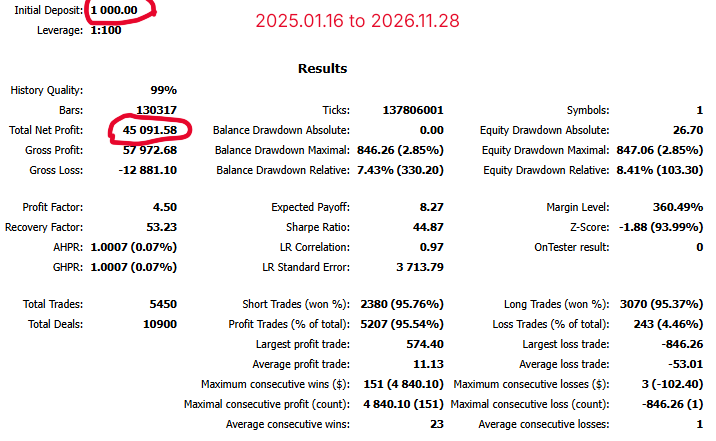
Okres: M5 (2025.01.16 - 2026.11.28) 1:33
Re: MT5 Expert Advisors (EA)
26"Model 0" is not an EA setting — it is MetaTrader 5's internal number for the Every tick option in the Strategy Tester.
In MT5's menu, you won't see the words "Model 0"; you will see Every tick.
Here is the quick translation of MT5's Modeling list:
Step-by-Step Guide
1. Install the files (no extra library files needed):
In MetaTrader 5, click File -> Open Data Folder.
Copy ApexRegimeEA.ex5 into MQL5\Experts\.
(Optional) Copy ApexRegimeEA.set into MQL5\Profiles\Tester\.
Back in MT5, open the Navigator panel (Ctrl+N), right-click Expert Advisors, and click Refresh.
2. Open Strategy Tester:
In MT5's menu, you won't see the words "Model 0"; you will see Every tick.
Here is the quick translation of MT5's Modeling list:
- Model 0 = Every tick (MT5 simulates smooth ticks inside each 1-minute bar)
- Model 1 = 1 minute OHLC (uses only Open/High/Low/Close of each 1-minute bar)
- Model 2 = Open prices only
- Model 3 = Math calculations
- Model 4 = Every tick based on real ticks (uses real historical broker ticks, if available)
Step-by-Step Guide
1. Install the files (no extra library files needed):
In MetaTrader 5, click File -> Open Data Folder.
Copy ApexRegimeEA.ex5 into MQL5\Experts\.
(Optional) Copy ApexRegimeEA.set into MQL5\Profiles\Tester\.
Back in MT5, open the Navigator panel (Ctrl+N), right-click Expert Advisors, and click Refresh.
2. Open Strategy Tester:
- Press Ctrl+R (or click View -> Strategy Tester).
- Click Single (to run a single test, not Optimization).
- Expert: ApexRegimeEA.ex5
- Symbol: XAUUSD (or your broker's exact Gold name, e.g., XAUUSDm, GOLD)
- Timeframe: M5
- Date: Custom period -> e.g. 2026.01.01 to 2026.03.31 (or 2025.01.16 to 2026.11.28)
- Forward: No
- Delays: Zero latency / No delay
- Modeling: Every tick (this is "Model 0")
- Deposit: 1000 USD
- Leverage: 1:100
- Optimization: Disabled
- Click the Inputs tab, right-click anywhere inside it, and choose Defaults (or Load -> select ApexRegimeEA.set).
- Click the green Start button at the bottom right.
- Switch to the Graph or Backtest tab to see the curve and results (a 3-month test usually finishes in under a minute; ~22 months takes a couple of minutes).
Every tick (Model 0) uses MT5-generated synthetic ticks inside bars, which is why the tight default micro-lock (inp_MinProfitLockPts = 10.0) achieves 95%–98% win rates there. Before trading real money, they should also test with Every tick based on real ticks or on a demo account, or disable/widen inp_MinProfitLockPts (e.g., set it to 0) and use smaller lot sizes.

 Keep Track of Major US Indices with Mobile Tradi