This MT4 DCA grid bot automatically generates trading levels. It adapts to different asset classes (Gold, BTC, Major FX, Custom) by applying specific upper and lower multipliers based on their typical volatility (e.g., ±30% for BTC, ±10% for FX).
The grid periods (quarters, halves, or yearly) are created using an enum selection. The indicator generates exact start and end dates for the chosen period (e.g., H1 spans January to June). It calculates the grid's range boundaries by applying the asset's multipliers to the closing price immediately before the selected period begins.
i made this into into different asset class i mostly trade btc and gold but it also have option for major fx if you are trading btc for example load the indicator select btc in the asset class then select which part of the grid you want to see it has yearly grids, grids by quarters and grids by half eveything is calculated automatically .
IT ALSO SHOWS BOTH BUY AND SELL SIGNALS
IF YOU HAVE ANY IDEA ON HOW TO IMPROVE THIS INDICATOR PLEASE HELP OUT
Re: Something interesting from Chatgpt/AI please post here
532Can someone add an alert to this? This indicator is pretty good but from what I can see, it does not send an "Alert" once the wedge is confirmed and broken.Pelle wrote: Sat Jul 11, 2026 10:58 pm Update: Smart Wedge Pattern Indicator (English & Performance Fixes)
I’ve made a few quality-of-life updates to the indicator to make it cleaner and more performant for English users:
Complete English Translation: Stripped out all dual-language (Arabic) text and removed the language selection parameter to streamline the settings menu. The indicator, labels, and alerts are now 100% in English.
UI Clean-up & Encoding Fixes: Removed the emojis that were causing garbled/corrupted characters (ð...) to appear in the MetaTrader input window and on the chart's target lines due to MT4's ANSI string encoding.
Optimized Default Settings: Changed the default Max history bars from 0 (unlimited) to 3000. This prevents the indicator from freezing or slowing down the terminal when first attached to charts with deep history.
Re: Something interesting from Chatgpt/AI please post here
533Alert Updates & Fixes:billbroch wrote: Wed Jul 15, 2026 3:04 am Can someone add an alert to this? This indicator is pretty good but from what I can see, it does not send an "Alert" once the wedge is confirmed and broken.
Fixed Breakout Alerts: Resolved a bug in the original code where breakout alerts were evaluating open bars instead of closed bars, preventing them from firing. Breakout alerts now correctly trigger exactly once when a candle closes outside the wedge.
Added Formation Alerts: Introduced a brand-new alert that fires the moment a wedge pattern is officially formed (when the 4th pivot point is locked in), so you are notified before the breakout happens.
New Settings: Added clean input parameters allowing users to independently toggle standard alerts and push notifications for both "Wedge Formed" and "Confirmed Breakout".
Re: Something interesting from Chatgpt/AI please post here
534Here are some more TradingView translations; hopefully, they prove useful to someone. I haven't managed to test everything—perhaps I should have before publishing.
So, the codes is provided "as is."
Original TradingView scripts here:
https://www.tradingview.com/script/8827 ... age-Based/
https://www.tradingview.com/script/ZHGP ... BigBeluga/
EDIT
AI wrote the following regarding the differences compared to the original Pine Script code:
Ah, good point! It's very helpful to explicitly state that the time is bound to New York time. Here is the updated version of the summary with that clarification included:
***
### **What's New in this MQL5 Version? (Differences from the original Pine Script)**
While this is a highly accurate port of the original Order Flow Dashboard, we've taken the opportunity to fix a few logical bugs found in the original code and add some highly requested features specific to this MetaTrader 5 version:
* **New "Low/Zero Aggression" Alerts:** We added a brand new alert capability not found in the original. You can now set a custom threshold (e.g., `0.0%`) to receive alerts whenever Aggressive Buying or Aggressive Selling completely dries up on the tape. Perfect for catching exhaustion and potential reversals.
* **True ARGB Transparency:** The original script attempted to simulate transparency by just making the background color a darker grey. This MQL5 version leverages MT5's native True ARGB engine—meaning your background transparency slider works flawlessly. You can now make the dashboard 100% solid (so chart candles don't bleed through) or genuinely semi-transparent.
* **Cumulative Delta Reset Fix:** We patched a logic flaw from the original Pine Script where the exact reset bar (e.g., 09:30) would accidentally discard its own buying and selling volume. This version correctly captures the opening bar's volume in your daily cumulative delta.
* **Timeframe-Agnostic Session Resets:** The original code checked for an exact minute-match to trigger daily resets. If you used it on an H1 chart (where bars open at 09:00 and 10:00), the reset would silently fail! We rebuilt the reset engine to accurately track New York session day-boundaries. It will now flawlessly reset the Big Contracts and Cumulative Delta across *all* timeframes.
* *(Note: The default `0930` reset time refers strictly to **09:30 AM New York Exchange Time**—the US equity/CME market open—regardless of what local time your broker's server uses).*
* **Immune to Table UI Glitches:** The Pine Script version occasionally suffered from a permanent table-merging UI glitch if no big contracts fired early in the session. Because this MQL5 version dynamically renders exact graphical objects instead of rigid tables, the columns will never collapse or hide your data.
***
So, the codes is provided "as is."
Original TradingView scripts here:
https://www.tradingview.com/script/8827 ... age-Based/
https://www.tradingview.com/script/ZHGP ... BigBeluga/
EDIT
AI wrote the following regarding the differences compared to the original Pine Script code:
Ah, good point! It's very helpful to explicitly state that the time is bound to New York time. Here is the updated version of the summary with that clarification included:
***
###
 **What's New in this MQL5 Version? (Differences from the original Pine Script)**
While this is a highly accurate port of the original Order Flow Dashboard, we've taken the opportunity to fix a few logical bugs found in the original code and add some highly requested features specific to this MetaTrader 5 version:
* **New "Low/Zero Aggression" Alerts:** We added a brand new alert capability not found in the original. You can now set a custom threshold (e.g., `0.0%`) to receive alerts whenever Aggressive Buying or Aggressive Selling completely dries up on the tape. Perfect for catching exhaustion and potential reversals.
* **True ARGB Transparency:** The original script attempted to simulate transparency by just making the background color a darker grey. This MQL5 version leverages MT5's native True ARGB engine—meaning your background transparency slider works flawlessly. You can now make the dashboard 100% solid (so chart candles don't bleed through) or genuinely semi-transparent.
* **Cumulative Delta Reset Fix:** We patched a logic flaw from the original Pine Script where the exact reset bar (e.g., 09:30) would accidentally discard its own buying and selling volume. This version correctly captures the opening bar's volume in your daily cumulative delta.
* **Timeframe-Agnostic Session Resets:** The original code checked for an exact minute-match to trigger daily resets. If you used it on an H1 chart (where bars open at 09:00 and 10:00), the reset would silently fail! We rebuilt the reset engine to accurately track New York session day-boundaries. It will now flawlessly reset the Big Contracts and Cumulative Delta across *all* timeframes.
* *(Note: The default `0930` reset time refers strictly to **09:30 AM New York Exchange Time**—the US equity/CME market open—regardless of what local time your broker's server uses).*
* **Immune to Table UI Glitches:** The Pine Script version occasionally suffered from a permanent table-merging UI glitch if no big contracts fired early in the session. Because this MQL5 version dynamically renders exact graphical objects instead of rigid tables, the columns will never collapse or hide your data.
***
 Re: Something interesting from Chatgpt/AI please post here
535
Dynamic Bias Moving Average
This is a three-layered Moving Average which can "stretch", "accelerate" and "lean" toward price depending on volatility and trend strength.
Dynamic Bias MA is an adaptive Moving Average that combines volatility-aware responsiveness with directional biasing. It can automatically accelerate or reposition itself when price deviates beyond a user-defined threshold, then apply either residual-based or trend-slope bias to produce a moving average that remains responsive in strong trends while resisting excessive lag in changing market conditions.
If you toggle both:
Unique features
Here is the fixed version 2.2 of my Dynamic Bias MA
Sorry v2.1 was repainting if SMA was selected.
For the MT5 version, please see here.
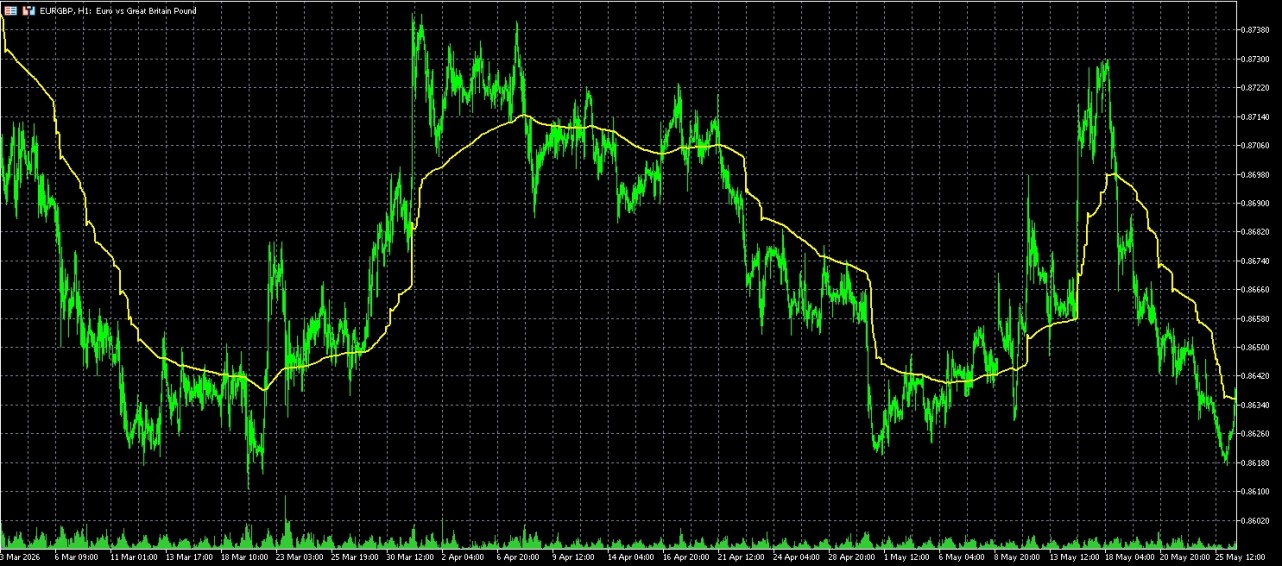
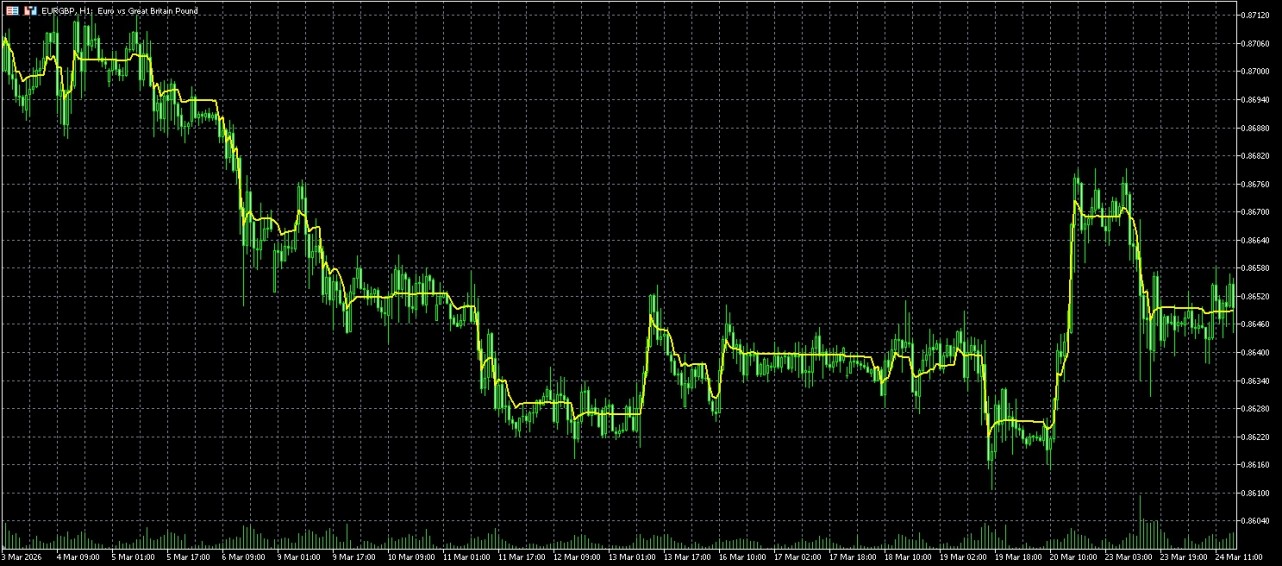
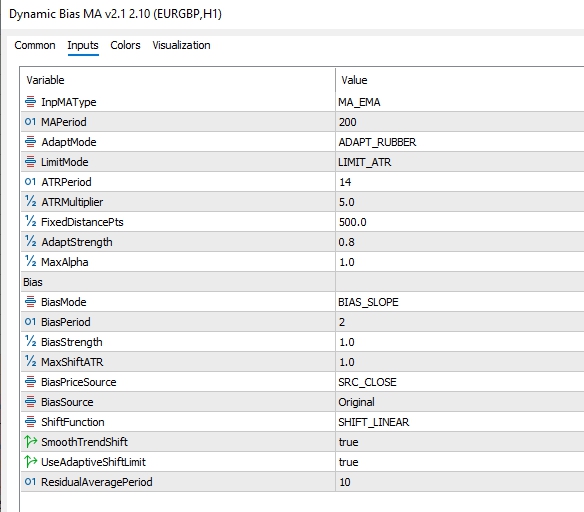
This is a three-layered Moving Average which can "stretch", "accelerate" and "lean" toward price depending on volatility and trend strength.
Dynamic Bias MA is an adaptive Moving Average that combines volatility-aware responsiveness with directional biasing. It can automatically accelerate or reposition itself when price deviates beyond a user-defined threshold, then apply either residual-based or trend-slope bias to produce a moving average that remains responsive in strong trends while resisting excessive lag in changing market conditions.
If you toggle both:
- Bias = OFF
- Adapt = OFF
Unique features
- If price stretches unusually far away, it either pulls itself toward price (Rubber Band mode) or temporarily speeds up (Adaptive Alpha mode).
- It then applies an intelligent offset based on either how far price has drifted from the average (Residual Bias) or how strongly the average is already trending (Slope Bias).
Here is the fixed version 2.2 of my Dynamic Bias MA
Sorry v2.1 was repainting if SMA was selected.
For the MT5 version, please see here.
Scalping the Century TimeFrame since 1999
Re: Something interesting from Chatgpt/AI please post here
536Here’s another attempt at something AI-related.
https://www.tradingview.com/script/gjFS ... ndicators/
I’ve extracted only the relevant indicator components from the strategy.
https://www.tradingview.com/script/gjFS ... ndicators/
I’ve extracted only the relevant indicator components from the strategy.
Re: Something interesting from Chatgpt/AI please post here
537Thanks but when i use it trash my PC. Maybe a coder in the site can helpPelle wrote: Fri Jul 24, 2026 4:09 am Here’s another attempt at something AI-related.
https://www.tradingview.com/script/gjFS ... ndicators/
I’ve extracted only the relevant indicator components from the strategy.
Re: Something interesting from Chatgpt/AI please post here
538cladi53, please try this one:cladi53 wrote: Fri Jul 24, 2026 4:48 am Thanks but when i use it trash my PC. Maybe a coder in the site can help
Re: Something interesting from Chatgpt/AI please post here
539You are absolutely right. I only convert other code for MT5.cladi53 wrote: Fri Jul 24, 2026 4:48 am Thanks but when i use it trash my PC. Maybe a coder in the site can help
I am not a real coder.
Re: Something interesting from Chatgpt/AI please post here
540Mi macho Dogo también murió. Ahora tengo un macho Cane Corso de dos años que necesitaba un nuevo hogar.cladi53 wrote: Fri Jul 24, 2026 4:48 am Thanks but when i use it trash my PC. Maybe a coder in the site can help