Re: Python to MT5
2The Continuation Index
Links: |TradingView|TradeStation|NinjaTrader|MT4|MT5|Python|
Python: September 2025
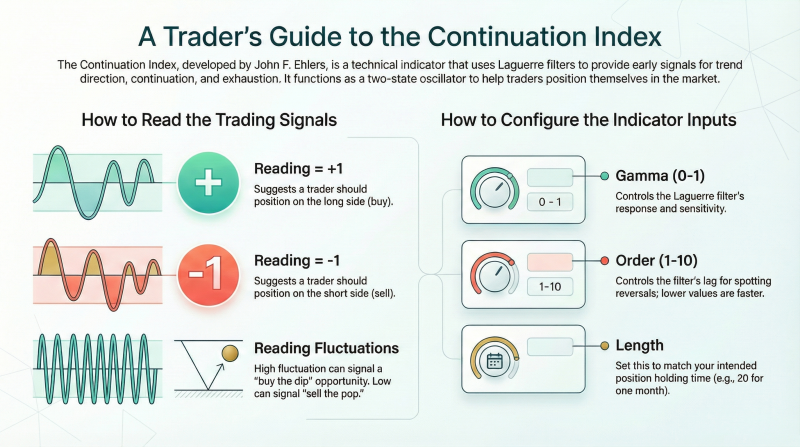
Following is an implementation of the continuation index, as introduced John Ehlers’ article in this issue,
“The Continuation Index,” in the Python programming language.
The continuation index is based on Ehlers’ UltimateSmoother function and the Laguerre filter function.
The code given here imports the required Python libraries, imports data from Yahoo Finance,
converts the EasyLanguage code given in Ehlers’ article to Python for the continuation index, and compares parameters.
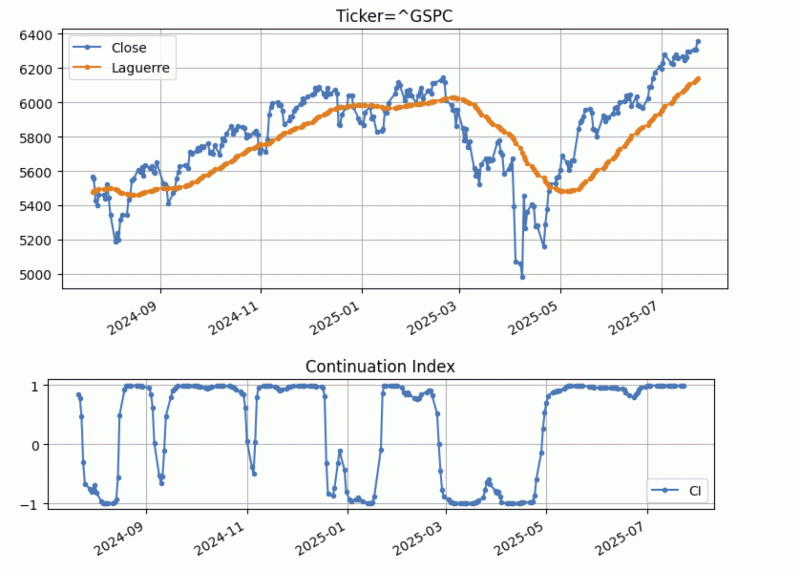
The chart below shows the continuation index on a daily chart of the emini S&P 500.
 -----------------------------------------------------------------------------------------------------
DOWNLOAD:
The Continuation Index.pdf
Links: |TradingView|TradeStation|NinjaTrader|MT4|MT5|Python|
Python: September 2025
Following is an implementation of the continuation index, as introduced John Ehlers’ article in this issue,
“The Continuation Index,” in the Python programming language.
The continuation index is based on Ehlers’ UltimateSmoother function and the Laguerre filter function.
The code given here imports the required Python libraries, imports data from Yahoo Finance,
converts the EasyLanguage code given in Ehlers’ article to Python for the continuation index, and compares parameters.
Code: Select all
"""
Written By: Rajeev Jain, 2025-07-23
Trader Tips python code for TAS&C Magazine article "The Continuation Index"

"""

# import required python libraries
%matplotlib inline

import pandas as pd
import numpy as np
import math
import datetime as dt
import yfinance as yf
print(yf.__version__)

0.2.58

# Use Yahoo Finance python package to obtain OHLCV data for the SP500 index
symbol = '^GSPC'
ohlcv = yf.download(
    symbol,
    start="2019-01-01",
    end="2025-07-24",
    #group_by="Ticker",
    auto_adjust=True,
    multi_level_index=False,
    progress=False,
)

# Python functions to implement UltimateSmoother, Laguerre Filter and
# Continuation Index as defined in John Ehlers’ article.
def ultimate_smoother(price_series, period):
    """
    Ultimate Smoother function converted from EasyLanguage to Python.

    Parameters:
        price_series (list or np.array): Time series of prices (e.g., closing
        prices)
        period (float): Smoothing period

    Returns:
        np.array: Smoothed price series
    """
    price_series = np.asarray(price_series)
    n = len(price_series)
    US = np.zeros(n)

    # Filter coefficients
    Q = math.exp(-1.414 * math.pi / period)
    c1 = 2 * Q * math.cos(1.414 * math.pi / period)
    c2 = Q * Q
    a0 = (1 + c1 + c2) / 4

    for i in range(n):
        if i < 3:
            US[i] = price_series[i]
        else:
            US[i] = ((1 - a0) * price_series[i] +
                     (2 * a0 - c1) * price_series[i - 1] +
                     (c2 - a0) * price_series[i - 2] +
                     c1 * US[i - 1] -
                     c2 * US[i - 2])
    return US

def laguerre_filter(price_series, gama, order, length):
    """
    Laguerre Filter Function converted from EasyLanguage to Python.
    Parameters:
        price_series (list or np.array): Input price data
        gama (float): Laguerre parameter, 0 <= gama < 1
        order (int): Filter order (integer <= 10)
        length (float): Length for Ultimate Smoother
    Returns:
        np.array: Laguerre filtered series
    """
    assert 0 <= gama < 1, "gama must be in [0, 1)"
    assert order <= 10 and order >= 1, "order must be integer between 1 and 10"
    price_series = np.asarray(price_series)
    n = len(price_series)
    output = np.zeros(n)

    # Initialize Laguerre matrix: shape (order+1, 2)
    LG = np.zeros((order + 1, 2))

    # Precompute ultimate smoother once
    smoothed_price = ultimate_smoother(price_series, length)
    for t in range(n):
        # Shift previous values: LG[:, 2] = LG[:, 1]
        LG[:, 1] = LG[:, 0]
        # Update LG[1] using the smoothed price at current time
        LG[1, 0] = smoothed_price[t]
        # Compute rest of the Laguerre components recursively
        for count in range(2, order + 1):
            LG[count, 0] = (
                -gama * LG[count - 1, 1] +
                LG[count - 1, 1] +
                gama * LG[count, 1]
            )
        # Sum current values of LG[1] to LG[order]
        FIR = np.sum(LG[1:order + 1, 0])
        output[t] = FIR / order
    return output
def continuation_index(close_prices, gama=0.8, order=8, length=40):
    """
    Continuation Index by John F. Ehlers (converted from EasyLanguage).

    Parameters:
        close_prices (list or np.array): Series of closing prices
        gama (float): Laguerre gamma (0 <= gama < 1)
        order (int): Order of Laguerre filter (<= 10)
        length (int): Base smoothing period
    Returns:
        np.array: Continuation Index values
    """
    close_prices = np.asarray(close_prices)
    n = len(close_prices)

    # Step 1: Ultimate Smoother with Length / 2
    US = ultimate_smoother(close_prices, length / 2)
    # Step 2: Laguerre Filter
    LG = laguerre_filter(close_prices, gama, order, length)
    # Step 3: Variance = avg(abs(US - LG)) over Length
    diff = np.abs(US - LG)
    variance = np.convolve(diff, np.ones(length)/length, mode='same')
    # Step 4: Normalized difference, scaled by 2
    with np.errstate(divide='ignore', invalid='ignore'):
        ref = np.where(variance != 0, 2 * (US - LG) / variance, 0)
    # Step 5: Inverse Fisher Transform compression
    CI = (np.exp(2 * ref) - 1) / (np.exp(2 * ref) + 1)
    return CI

# Compare Laguerre filter response for gamma setting of 0.4 vs gamma setting of 0.8
gama1 = 0.4
gama2 = 0.8
order = 8
length = 40
df = ohlcv.copy()
df['Laguerre_0.4'] = laguerre_filter(df['Close'], gama1, order, length)
df['Laguerre_0.8'] = laguerre_filter(df['Close'], gama2, order, length)
cols = ['Close', 'Laguerre_0.4', 'Laguerre_0.8']
ax = df[-255:][cols].plot(marker='.', grid=True, figsize=(9,6), title=f'Ticker={symbol}, Laguerre Filder Response, Gamma Parameter Comparison')
ax.set_xlabel('')
plt.show()

# Compare Laguerre filter response for order of 4 vs order of 8
order1 = 4
order2 = 8
length = 40
gama = 0.8
df = ohlcv.copy()
df['Laguerre_4th'] = laguerre_filter(df['Close'], gama, order1, length)
df['Laguerre_8th'] = laguerre_filter(df['Close'], gama, order2, length)
df
cols = ['Close', 'Laguerre_4th', 'Laguerre_8th']
ax = df[-255:][cols].plot(marker='.', grid=True, figsize=(9,6), title=f'Ticker={symbol}, Laguerre Filder Response, Order Parameter Comparison')
ax.set_xlabel('')
plt.show()

# Example of continuation index using default setting for
# daily close of S&P 500 index
def plot_ci(df):
    ax = df[['Close', 'Laguerre']].plot(
        marker='.',
        grid=True,
        figsize=(9,4),
        title=f'Ticker={symbol}'
    )
    ax.set_xlabel('')
    ax = df[['CI']].plot(
        marker='.',
        grid=True,
        figsize=(9,2),
        title=f'Continuation Index'
    )
    ax.set_xlabel('')

gama=0.8
order=8
length=40
df = ohlcv.copy()
df['Laguerre'] = laguerre_filter(df['Close'], gama, order, length)
df['CI'] = continuation_index(df['Close'], gama, order, length)
plot_ci(df[-252:])
DOWNLOAD:
The Continuation Index.pdf
Re: Python to MT5
3The Reversion Index
Links: |TradingView|TradeStation|NinjaTrader|MT4|MT5|Python|
Python: January 2026
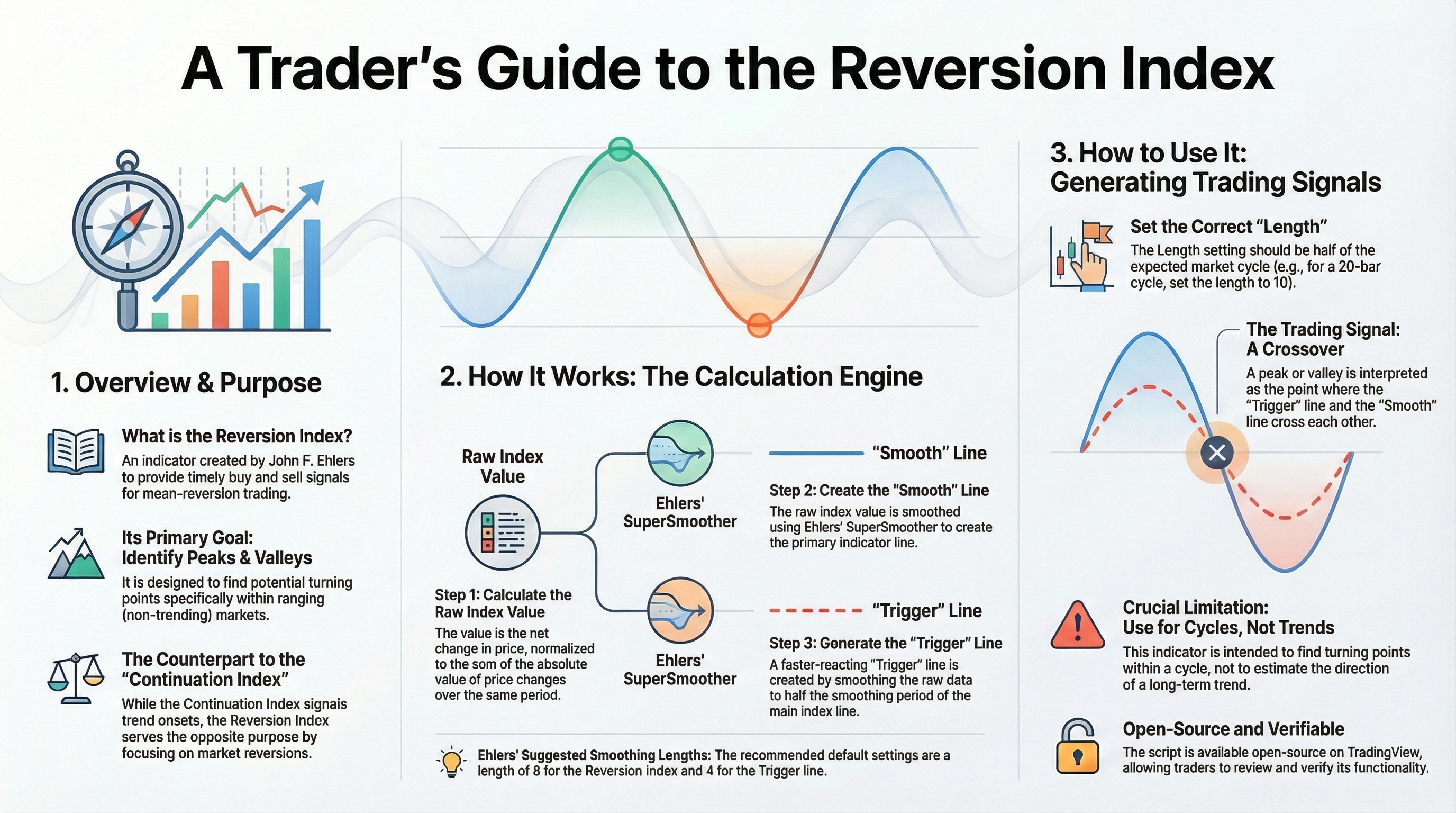
Following is Python code to implement concepts described in John Ehlers’ article in this issue, “The Reversion Index.”
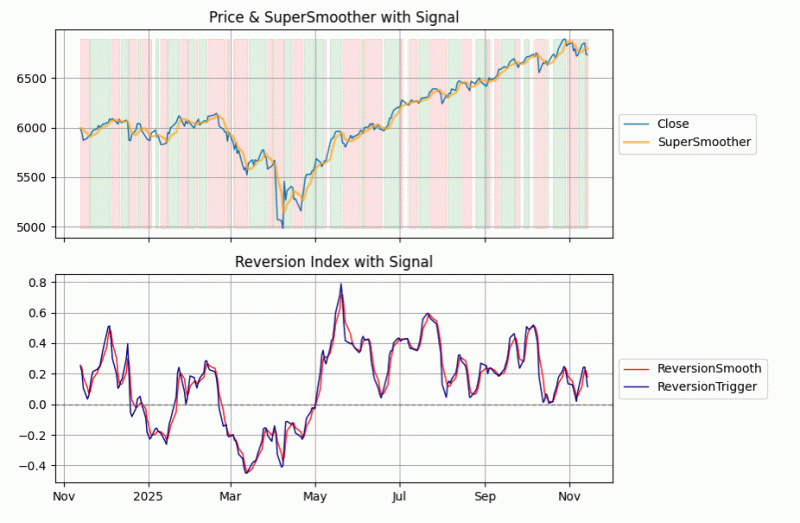
The top plot in the picture shows an example of the SuperSmoother and its signals superimposed on price; the red and green vertical shading highlights when buy and sell signals are active. The bottom chart plots the reversion index along with its smoothed version.
------------------------------------------------------------------------------------------------
DOWNLOAD:
ReversionIndex.pdf
Links: |TradingView|TradeStation|NinjaTrader|MT4|MT5|Python|
Python: January 2026
Following is Python code to implement concepts described in John Ehlers’ article in this issue, “The Reversion Index.”
Code: Select all
"""
Written By: Rajeev Jain, jainraje@yahoo.com

Python code to implement concepts in Technical Analysis of S&C Magazine
January 2026 article "The Reversion Index" by John F Ehlers. This python
code is provided for TraderTips section of the magazine.

2025-11-12  Initial implementation
2025-11-14  Uploaded to github

https://github.com/jainraje/TraderTipArticles/

"""

# Import required python libraries

%matplotlib inline

import pandas as pd
import numpy as np
import yfinance as yf
import math
import datetime as dt
import matplotlib.pyplot as plt


# Use Yahoo Finance python package to obtain OHLCV data for desired instrument.

symbol = '^GSPC'
start = "2023-11-13"
end = dt.datetime.now().strftime('%Y-%m-%d')
end = '2025-11-15'
ohlcv = yf.download(
    symbol,
    start,
    end,
    group_by="Ticker",
    auto_adjust=True
)
ohlcv = ohlcv[symbol]
ohlcv


# three functions to implement concepts: 1) super_smoother 2) reversion_index
# and 3) plot_reversion_index to plot relevant signals

def super_smoother(price: pd.Series, period: float) -> pd.Series:
    """
    Vectorized Ehlers SuperSmoother filter (© John F. Ehlers)

    Parameters
    ----------
    price : pd.Series
        Input price series (e.g., closing prices)
    period : float
        Smoothing period

    Returns
    -------
    pd.Series
        Smoothed price series
    """
    q = np.exp(-1.414 * np.pi / period)
    c1 = 2 * q * np.cos(np.radians(1.414 * 180 / period))
    c2 = q * q
    a0 = (1 - c1 + c2) / 2

    price_vals = price.to_numpy()
    out_values = np.zeros_like(price_vals)

    # Initialize first four values to the original price
    out_values[:4] = price_vals[:4]

    # Apply recursive filter from index 4 onward
    for i in range(4, len(price_vals)):
        out_values[i] = a0 * (price_vals[i] + price_vals[i-1]) + c1 * out_values[i-1] - c2 * out_values[i-2]

    return pd.Series(out_values, index=price.index)


def reversion_index(close: pd.Series, length: int = 20) -> pd.DataFrame:
    """
    Ehlers Reversion Index (© 2025 John F. Ehlers)
    Correct and fully vectorized Python version.
    """
    close = close.astype(float)

    # Delta: change from previous bar
    delta = close.diff().fillna(0)

    # Rolling sums of delta and absolute delta
    delta_sum = delta.rolling(window=length, min_periods=1).sum()
    abs_delta_sum = delta.abs().rolling(window=length, min_periods=1).sum()

    # Ratio: safely avoid division by zero
    ratio = delta_sum / abs_delta_sum.replace(0, np.nan)
    ratio = ratio.fillna(0)

    # Smooth and trigger lines
    smooth = super_smoother(ratio, period=8)
    trigger = super_smoother(ratio, period=4)

    return pd.DataFrame({
        'ReversionSmooth': smooth,
        'ReversionTrigger': trigger
    }, index=close.index)


def plot_reversion_index(df):

    import matplotlib.pyplot as plt
    import matplotlib.dates as mdates

    fig, (ax1, ax2) = plt.subplots(2, 1, figsize=(12, 9), sharex=True, gridspec_kw={'height_ratios':[2,2]})

    # ----- Top: Price & SuperSmoother -----
    ax1.plot(df.index, df['Close'], label='Close', linewidth=1)
    ax1.plot(df.index, df['SuperSmoother'], label='SuperSmoother', linewidth=2, alpha=0.6, color='orange')

    # Shading for bullish/bearish signals
    ax1.fill_between(df.index, df['Close'].min(), df['Close'].max(),
                     where=df['Signal'] == 1, color='green', alpha=0.1)
    ax1.fill_between(df.index, df['Close'].min(), df['Close'].max(),
                     where=df['Signal'] == -1, color='red', alpha=0.1)

    ax1.set_title('Price & SuperSmoother with Signal')
    ax1.grid(True)
    ax1.legend(loc='center left', bbox_to_anchor=(1, 0.5))

    # ----- Bottom: ReversionSmooth & ReversionTrigger -----
    ax2.plot(df.index, df['ReversionSmooth'], label='ReversionSmooth', linewidth=1, color='red')
    ax2.plot(df.index, df['ReversionTrigger'], label='ReversionTrigger', linewidth=1, color='darkblue')
    ax2.axhline(0, color='gray', linestyle='--', linewidth=1)

    # Overlay Signal as step plot
    #ax2.step(df.index, df['Signal'], where='mid', label='Signal', color='purple', linewidth=1.5, alpha=0.5)

    ax2.set_title('Reversion Index with Signal')
    ax2.grid(True)
    ax2.legend(loc='center left', bbox_to_anchor=(1, 0.5))

    # ----- Improve date formatting on the bottom subplot -----
    ax2.xaxis.set_major_locator(mdates.AutoDateLocator())
    ax2.xaxis.set_major_formatter(mdates.ConciseDateFormatter(mdates.AutoDateLocator()))
    plt.setp(ax2.get_xticklabels(), rotation=0, ha='center')  # horizontal, centered

    #plt.xlabel('Date')
    plt.tight_layout()
    plt.show()


# Call functions to run required calculations. Set buy when ReversionTrigger
# swings above ReversionSmooth and sell for when ReversionTrigger swings below.
# Different period and lengths can be tested to determine optimum settings.
# Top plot close vs the SuperSmoother and red and white background shading to
# show highlight when buy and sell signals are active. Using slicing to plot
# last 1 year (aka 252 trading days).

df = ohlcv.copy()
df['SuperSmoother'] = super_smoother(df['Close'], period=10)
df = df.join(reversion_index(df['Close'], length=20))
df['Signal'] = np.where(df['ReversionTrigger'] > df['ReversionSmooth'], 1, -1)
plot_reversion_index(df[-252:])
------------------------------------------------------------------------------------------------
DOWNLOAD:
ReversionIndex.pdf
Re: Python to MT5
4One Euro filter
Links: |TradingView|TradeStation|NinjaTrader|MT4|MT5|Python|
Python: December 2025
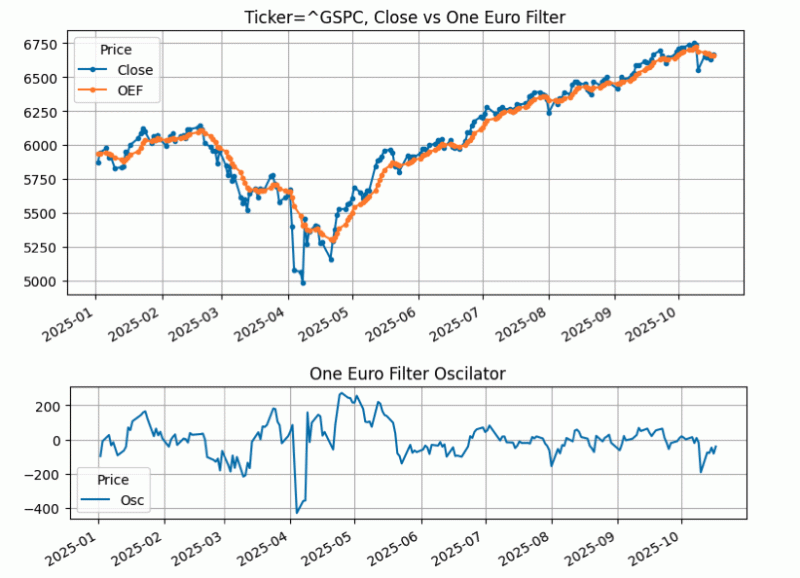
In his article in this issue, “The One Euro Filter,” John Ehlers discusses the one euro filter, which was originally developed and written about by Georges Casiez, Nicolas Roussel, and Daniel Vogel in 2012. In his article in this issue, Ehlers demonstrates how to plot this smoothing filter, discusses its effectiveness, and also discusses how this smoothing filter can be converted into an oscillator
Following is a Python code implementation based on the EasyLanguage code provided in Ehlers’ article for the one euro filter and oscillator.
Links: |TradingView|TradeStation|NinjaTrader|MT4|MT5|Python|
Python: December 2025
In his article in this issue, “The One Euro Filter,” John Ehlers discusses the one euro filter, which was originally developed and written about by Georges Casiez, Nicolas Roussel, and Daniel Vogel in 2012. In his article in this issue, Ehlers demonstrates how to plot this smoothing filter, discusses its effectiveness, and also discusses how this smoothing filter can be converted into an oscillator
Following is a Python code implementation based on the EasyLanguage code provided in Ehlers’ article for the one euro filter and oscillator.
Code: Select all
"""
# import required python libraries

import pandas as pd
import numpy as np
import yfinance as yf
import math
import datetime as dt
import matplotlib.pyplot as plt
import mplfinance as mpf

print(yf.__version__)

# three helper functions to 1) run one euro filter calculations 2) run
# oscillator calculations and to 3) plot the close vs one euro filter output
# on one subplot and the oscillator on a second subplot using built-in
# matplotlib capabilities.

def calc_one_euro_filter(close, period_min=10, beta=0.2):
    """
    One Euro Filter Indicator
    Adapted from Georges Casiez et al. (CHI 2012)
    Converted from EasyLanguage to Python

    Args:
        close (array-like): List or NumPy array of closing prices
        period_min (float): Minimum cutoff period (default=10)
        beta (float): Responsiveness factor (default=0.2)

    Returns:
        np.ndarray: Smoothed signal
    """
    close = np.asarray(close)
    n = len(close)

    # Initialize arrays
    smoothed = np.zeros(n)
    smoothed_dx = np.zeros(n)

    period_dx = 10.0
    alpha_dx = 2 * np.pi / (4 * np.pi + period_dx)

    # Initialization
    smoothed[0] = close[0]
    smoothed_dx[0] = 0.0

    for i in range(1, n):
        # Delta smoothing (EMA of price change)
        smoothed_dx[i] = alpha_dx * (close[i] - close[i - 1]) + (1 - alpha_dx) * smoothed_dx[i - 1]

        # Adjust cutoff based on rate of change
        cutoff = period_min + beta * abs(smoothed_dx[i])

        # Compute adaptive alpha
        alpha3 = 2 * np.pi / (4 * np.pi + cutoff)

        # Adaptive smoothing
        smoothed[i] = alpha3 * close[i] + (1 - alpha3) * smoothed[i - 1]

    return smoothed


def calc_highpass(price, period):
    """
    Two-pole high-pass filter (John Ehlers style)

    Args:
        price (array-like): Sequence of prices
        period (float): Filter period

    Returns:
        np.ndarray: High-pass filtered values
    """
    price = np.asarray(price, dtype=float)
    n = len(price)
    out = np.zeros(n)

    # Filter coefficients
    a1 = np.exp(-1.414 * np.pi / period)
    b1 = 2 * a1 * np.cos(math.radians(1.414 * 180 / period))
    c2 = b1
    c3 = -a1 ** 2
    c1 = (1 + c2 - c3)/4

    # Main filter loop
    for i in range(2, n):
        out[i] = (
            c1 * (price[i] - 2 * price[i - 1] + price[i - 2])
            + c2 * out[i - 1]
            + c3 * out[i - 2]
        )

    # Initialize first values (pass-through)
    out[0:2] = price[0:2]

    return out


def plot_one_euro_filter(df):

    ax = df[['Close', 'OEF']].plot(grid=True, title=f"Ticker={symbol}, Close vs One Euro Filter", figsize=(9,4), marker='.')
    ax.set_xlabel('')

    ax = df[['Osc']].plot(grid=True, title=f"One Euro Filter Oscilator", figsize=(9,2))
    ax.set_xlabel('')


# Use Yahoo Finance python package to obtain OHLCV data for desired symbol

symbol = '^GSPC'
start = "1990-01-01"
end = dt.datetime.now().strftime('%Y-%m-%d')

ohlcv = yf.download(
    symbol,
    start,
    end,
    group_by="Ticker",
    auto_adjust=False
)
ohlcv = ohlcv[symbol]


# call helper functions to calculate the One Euro Filter output (named OEF) and the
# Oscillaor output (named Osc) and then plot close, OEF and Ocs values.

df['OEF'] = calc_one_euro_filter(df['Close'], period_min=10, beta=0.2)
df['Osc'] = calc_highpass(df['Close'], period=54)
plot_one_euro_filter(df['2025':])
Re: Python to MT5
5Cybernetic Oscillator
Links: |TradingView|TradeStation|NinjaTrader|MT4|MT5|Python|
Python: June 2025
The Python code presented here is based on John Ehlers’ article in this issue, “Making A Better Oscillator,” which introduces his new cybernetic oscillator.
The routines given here perform tasks related to implementing the cybernetic oscillator using the Python language. This includes: importing the required python libraries; obtaining OHLCV data by using the Yahoo Finance Python package; using panda’s built-in plotting function to display a price chart; building blocks to build the cybernetic oscillator indicator; using MatPlotLib to plot close, CO1 and CO2 values; and finally, a callable routine to implement an example trading strategy based on rate-of-change, as described in Ehlers’ article.
An example chart plotting both a long-term and short-term cybernetic oscillator is shown in Figure 8. A chart illustrating the creation of an example rate-of-change strategy is shown in Figure 9.
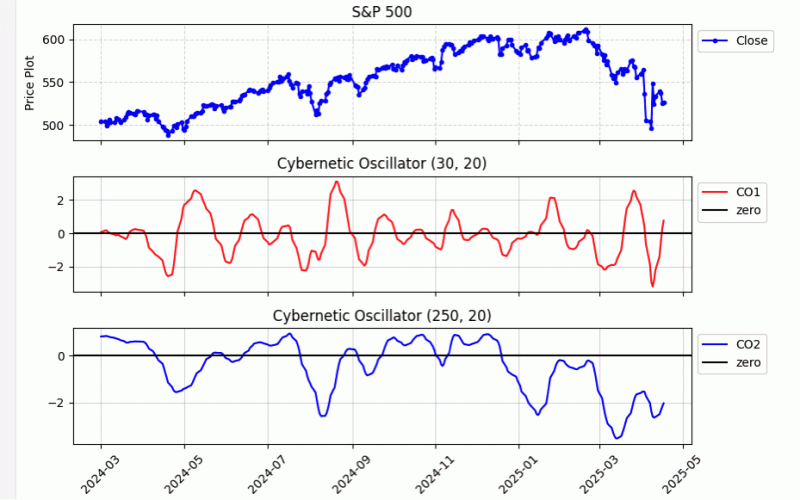 FIGURE 8: PYTHON. John Ehlers’ cybernetic oscillator is demonstrated here on a daily chart of the S&P 500. A short and longer-trend version are shown.
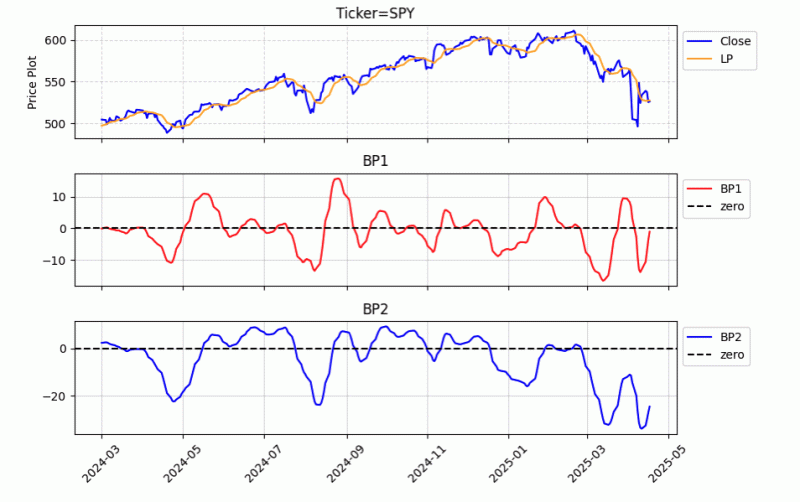 FIGURE 9: PYTHON. An example trading strategy incorporating the cybernetic oscillator is created for demonstration purposes. The strategy is a simple dual ROC strategy. The indicators are visualized using the MatplotLib routine. Here, LP, BP1, and BP2 can be observed along with price.
Links: |TradingView|TradeStation|NinjaTrader|MT4|MT5|Python|
Python: June 2025
The Python code presented here is based on John Ehlers’ article in this issue, “Making A Better Oscillator,” which introduces his new cybernetic oscillator.
The routines given here perform tasks related to implementing the cybernetic oscillator using the Python language. This includes: importing the required python libraries; obtaining OHLCV data by using the Yahoo Finance Python package; using panda’s built-in plotting function to display a price chart; building blocks to build the cybernetic oscillator indicator; using MatPlotLib to plot close, CO1 and CO2 values; and finally, a callable routine to implement an example trading strategy based on rate-of-change, as described in Ehlers’ article.
An example chart plotting both a long-term and short-term cybernetic oscillator is shown in Figure 8. A chart illustrating the creation of an example rate-of-change strategy is shown in Figure 9.
Code: Select all
#
# import required python libraries
#
%matplotlib inline
import pandas as pd
import numpy as np
import matplotlib.pyplot as plt
import yfinance as yf
import math
import datetime as dt
print(yf.__version__)

#
# Use Yahoo Finance python package to obtain OHLCV data
#
symbol = '^GSPC'
symbol = 'SPY'
ohlcv = yf.download(symbol, start="1995-01-01", end="2025-04-18", group_by="Ticker", auto_adjust=True)
ohlcv = ohlcv[symbol]

#
# Use pandas built in plot function to see simple price chart
#
ax = ohlcv['Close'].plot(
    figsize=(9,6),
    grid=True,
    title=f'{symbol}',
    #marker='.'
)


#
# Building block / routines used to implement cybernetic oscillaor indicator
#
def calc_highpass(price, period):

    a1 = np.exp(-1.414 * np.pi / period)
    b1 = 2 * a1 * np.cos(math.radians(1.414 * 180 / period))
    c2 = b1
    c3 = -a1 * a1
    c1 = (1 + c2 - c3)/4

    out_values = []
    for i in range(len(price)):
        if i >= 4:
            out_values.append(
                c1*(price[i] - 2*price[i-1] + price[i-2]) + c2*out_values[i-1] + c3*out_values[i-2]
            )
        else:
            out_values.append(price[i])

    return out_values

def calc_super_smoother(price, period):

        a1 = np.exp(-1.414 * np.pi / period)
        b1 = 2 * a1 * np.cos(math.radians(1.414 * 180 / period))
        c2 = b1
        c3 = -a1 * a1
        c1 = (1 - c2 - c3)

        out_values = []
        for i in range(len(price)):
            if i >= 4:
                out_values.append(c1*(price[i]+price[i-1])/2 + c2*out_values[i-1] + c3*out_values[i-2])
            else:
                out_values.append(price[i])

        return out_values

def calc_rms(price):

    length = len(price)
    sum_sq = 0
    for count in range(length):
        sum_sq += price[count] * price[count]
    return np.sqrt(sum_sq / length)

def calc_cybernetic_oscillator(close, params=(30, 20)):

    hp_length = params[0]
    lp_length = params[1]

    df = pd.DataFrame(index=close.index, data=close)
    df['HP'] = calc_highpass(close, hp_length)
    df['LP'] = calc_super_smoother(df['HP'], lp_length)
    df['RMS'] = df['LP'].rolling(100).apply(calc_rms)
    df['CO'] = df['LP']/df['RMS']

    return df['CO']

#
# Exampe python code to create two versions of the cybernetic oscillator
# as presented in June 2005 Trader Tip article
#

lp_length = 20
hp1_length = 30
hp2_length = 250

co1_params=(hp1_length, lp_length)
co2_params=(hp2_length, lp_length)

df = ohlcv.copy()
df['CO1'] = calc_cybernetic_oscillator(ohlcv['Close'], params=co1_params)
df['CO2'] = calc_cybernetic_oscillator(ohlcv['Close'], params=co2_params)
df


#
# MatPlotLib routine to plot Close, CO1 and CO2 values
#
def plot_indicators1(df):
    # Create a figure with three subplots stacked vertically
    fig, (ax1, ax2, ax3) = plt.subplots(3, 1, figsize=(9, 6), sharex=True)

    # Plotting the first subplot (e.g., Price Data)
    ax1.set_title(f"S&P 500")
    ax1.plot(df.index, df['Close'], label='Close', color='blue', marker='.')
    ax1.grid(True, linestyle='--', alpha=0.5)
    ax1.set_ylabel('Price Plot')
    ax1.legend(loc='upper left', bbox_to_anchor=(1, 1))

    # Plotting the second subplot
    ax2.set_title(f'Cybernetic Oscillator {co1_params}')
    ax2.plot(df.index, df['CO1'], label='CO1', color='red')
    ax2.axhline(y=0, color='black', linestyle='-', label='zero')
    #ax2.set_ylabel('Linear Slope')
    ax2.grid(True, linestyle='-', alpha=0.5)
    ax2.legend(loc='upper left', bbox_to_anchor=(1, 1))

    # Plotting the third subplot
    ax3.set_title(f'Cybernetic Oscillator {co2_params}')
    ax3.plot(df.index, df['CO2'], label='CO2', color='blue')
    ax3.axhline(y=0, color='black', linestyle='-', label='zero')
    ax3.grid(True, linestyle='-', alpha=0.5)
    ax3.legend(loc='upper left', bbox_to_anchor=(1, 1))

    # Rotate x-axis labels for better readability
    plt.xticks(rotation=45)

    # Improve overall layout
    plt.tight_layout()

    # Show the plot
    plt.show()


plot_indicators1(df['2024-03':'2025'])


#
# Example python code to implement the simple dual ROC strategy showcased
# in trader tip article the python code is bundled in a *strategy* routine
# so it can easily be called, paramater as passed into the routine as a variable
#
def strategy(ohlcv, params):

    df = ohlcv.copy()
    df['LP'] = calc_super_smoother(df['Close'], params[0])
    df['BP1'] = calc_highpass(df['LP'],params[1] )
    df['ROC1'] = df['BP1'] - df['BP1'].shift(2)

    df['BP2'] = calc_highpass(df['LP'],params[2])
    df['ROC2'] = df['BP2'] - df['BP2'].shift(2)

    df['Signal'] = np.where((df['ROC1'] > 0 ) & (df['ROC2'] >0 ), 1, np.nan)
    df['Signal'] = np.where((df['ROC1'] < 0 ) & (df['ROC2'] <0 ), 0, df['Signal'])
    df['Signal'] = df['Signal'].fillna(method='ffill')
    return df


params=(20, 55, 156)
data = strategy(ohlcv, params)
data


#
# The Simple Dual ROC strategy indicators are visualized in the MatplotLib
# routine below. Here LP, BP1 and BP2 can be see observed along with price
#
def plot_indicators2(df):

    # Create a figure with three subplots stacked vertically
    fig, (ax1, ax2, ax3) = plt.subplots(3, 1, figsize=(9, 6), sharex=True)

    # Plotting the first subplot (e.g., Price Data)
    ax1.set_title(f"Ticker={symbol}")
    ax1.plot(df.index, df['Close'], label='Close', color='blue',)
    ax1.plot(df.index, df['LP'], label='LP', color='orange', )
    ax1.grid(True, linestyle='--', alpha=0.5)
    ax1.set_ylabel('Price Plot')
    ax1.legend(loc='upper left', bbox_to_anchor=(1, 1))

    # Plotting the second subplot
    ax2.set_title(f'BP1')
    ax2.plot(df.index, df['BP1'], label='BP1', color='red')
    ax2.axhline(y=0, color='black', linestyle='--', label='zero')
    #ax2.set_ylabel('Linear Slope')
    ax2.grid(True, linestyle='-', alpha=0.5)
    ax2.legend(loc='upper left', bbox_to_anchor=(1, 1))

    # Plotting the third subplot
    ax3.set_title(f'BP2')
    ax3.plot(df.index, df['BP2'], label='BP2', color='blue')
    ax3.axhline(y=0, color='black', linestyle='--', label='zero')
    ax3.grid(True, linestyle='-', alpha=0.5)
    ax3.legend(loc='upper left', bbox_to_anchor=(1, 1))

    # Rotate x-axis labels for better readability
    plt.xticks(rotation=45)

    # Improve overall layout
    plt.tight_layout()

    # Show the plot
    plt.show()

plot_indicators2(data['2024-03':'2025'])


#
# A simple backtest framework/routines are provided which allow changing
# parameters and visualize performance results. Performance can be compared
# against Buy&Hold of same ticker by setting. All buy and sell occur on the
# day of the buy/sell signal using market close values
#
def backtest(data):

    df = data.copy()

    df['Return Ratio'] = np.where(df['Signal'].shift()==1, 1+df['Close'].pct_change(),1 )
    df['Strategy'] = df['Return Ratio'].cumprod()
    df['BH'] = (1+df['Close'].pct_change()).cumprod()

    df['Peak'] = df['Strategy'].cummax()
    df['% DD'] = 100*(df['Strategy']/df['Peak']-1)

    df['Peak'] = df['BH'].cummax()
    df['BH % DD'] = 100*(df['BH']/df['Peak']-1)

    df.at[df.index[0], 'Strategy'] = 1
    df.at[df.index[0], 'BH'] = 1

    return df


def plot_backtest_results(df, strategy_name="Simple Dual ROC Strategy", compare_bh_ena=False):

    fig, (ax1, ax2) = plt.subplots(2, 1, figsize=(9, 6), sharex=True)

    ax1.set_title(f"{strategy_name}, Ticker={symbol},")
    ax1.plot(df.index, df['Strategy'], label='Strategy Equity Curve', color='blue',)

    if compare_bh_ena:
        ax1.plot(df.index, df['BH'], label='Buy & Hold Equity Curve', color='orange',)
    ax1.grid(True, linestyle='--', alpha=0.5)
    ax1.set_ylabel('Cumulative Return')
    ax1.legend(loc='upper left', bbox_to_anchor=(1, 1))

    ax2.set_title(f"% Drawdown")
    ax2.plot(df.index, df['% DD'], label='Strategy Drawdown', color='blue',)

    if compare_bh_ena:
        ax2.plot(df.index, df['BH % DD'], label='Buy & Hold Drawdown', color='orange',)

    ax2.grid(True, linestyle='--', alpha=0.5)
    ax2.set_ylabel('% drawdown')
    ax2.legend(loc='upper left', bbox_to_anchor=(1, 1))

#
# Putting the building blocks together, parameters can be changed and results viewed visually
# Here using default values presenyed in article
#
params=(20, 55, 156)
data = strategy(ohlcv, params)
df = backtest(data['2009':'2024'])
plot_backtest_results(df, strategy_name="Simple Dual ROC Strategy", compare_bh_ena=False)


#
# Here change parameter and see results compared to buy & hold of same ticker
#
params=(50, 55, 156)
data = strategy(ohlcv, params)
df = backtest(data['2009':'2024'])
plot_backtest_results(df, compare_bh_ena=True)
Re: Python to MT5
6PMA: projected moving average
Links: |TradingView|TradeStation|NinjaTrader|MT4|MT5|Python|
Python: March 2025
In “Removing Moving Average Lag” in this issue, John Ehlers introduces his projected moving average (PMA), designed to remove the lag inherent in moving averages. His approach involves adding the slope times half the length of the average to the average itself to accomplish the projected moving average. The code listings given in Ehlers’ article cover the projected moving average as a function; the projected moving average indicator (and its prediction) to plot on a chart; and slope and its prediction, which in this case is an output from the PMA function code and is used to create an oscillator.
Following is an implementation of Ehlers’ coding in Python:
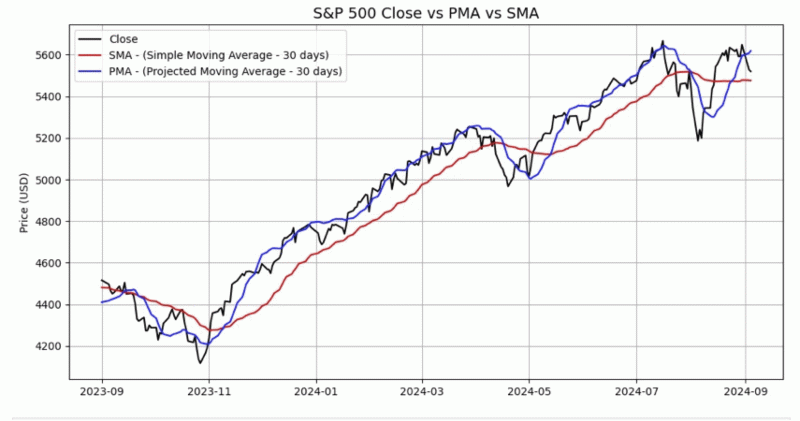 FIGURE 9: PYTHON. This displays an example of a 30-day PMA on a daily chart of the S&P 500 index along with a 30-day simple moving average (SMA) for comparison. The projected moving average, introduced by John Ehlers in his article in this issue, was coded here using the Python language and then plotted using Matplotlib.
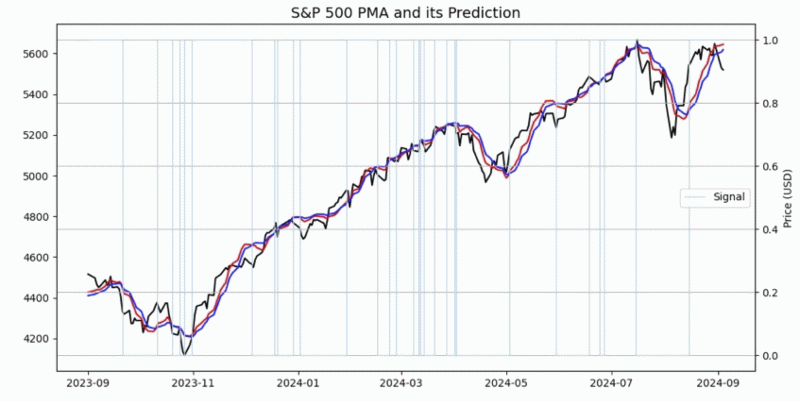 FIGURE 10: PYTHON. Here, the PMA and PMA prediction indicators are plotted on S&P 500 index daily data downloaded from Yahoo Finance. The vertical light-blue lines highlight the PMA and PMA prediction indicator crossovers.
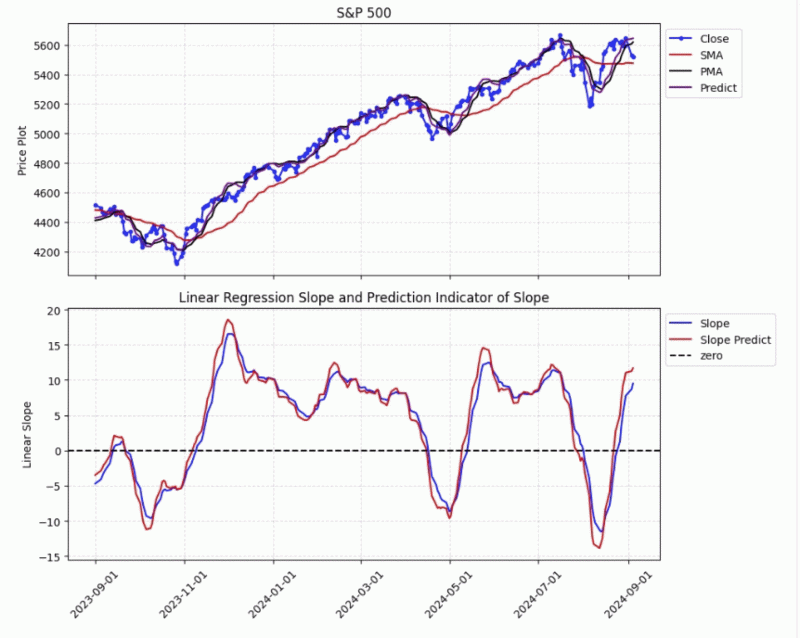 FIGURE 11: PYTHON. Here, slope and its prediction are plotted.
Links: |TradingView|TradeStation|NinjaTrader|MT4|MT5|Python|
Python: March 2025
In “Removing Moving Average Lag” in this issue, John Ehlers introduces his projected moving average (PMA), designed to remove the lag inherent in moving averages. His approach involves adding the slope times half the length of the average to the average itself to accomplish the projected moving average. The code listings given in Ehlers’ article cover the projected moving average as a function; the projected moving average indicator (and its prediction) to plot on a chart; and slope and its prediction, which in this case is an output from the PMA function code and is used to create an oscillator.
Following is an implementation of Ehlers’ coding in Python:
Code: Select all
#
# import required python libraries
#
import pandas as pd
import numpy as np
import datetime as dt

import matplotlib.pyplot as plt
import yfinance as yf


#
# Retrieve S&P 500 daily price data from Yahoo Finance
#

symbol = '^GSPC'
ohlcv = yf.download(symbol, start="2015-01-15", end="2025-01-22")
ohlcv


#
# Introducing the Projected Moving Average PMA
#

def linear_regression_slope(samples):
    # Use numpy's polyfit to calculate the slope (1st degree polynomial)
    m, b = np.polyfit(np.arange(len(samples)), np.array(samples), 1)

    return m

def calc_linear_regression_slope(in_series, length):
    slope = in_series.rolling(length).apply(linear_regression_slope)
    return slope

def calc_sma(in_series, length):
    return in_series.rolling(length).mean()

def calc_pma(in_series, length):
    sma = calc_sma(in_series, length)
    slope = calc_linear_regression_slope(in_series, length)
    pma = (sma + slope * length / 2)
    return pma


#
# S&P500 applying SMA and PMA indicators using 30 trading days
#

length = 30
df = ohlcv.copy()

df['SMA'] = calc_sma(df['Close'], length)
df['PMA'] = calc_pma(df['Close'], length)
simple_plot1(df['2023-09':'2024-09-04'], length)


#
# S&P500 applying SMA and PMA indicators using 200 trading days
#

length = 200
df = ohlcv.copy()

df['SMA'] = calc_sma(df['Close'], length)
df['PMA'] = calc_pma(df['Close'], length)
simple_plot1(df['2023-09':'2024-09-04'], length)


#
# Prediction to Further Reduce Lag
#

def calc_pma_prediction(pma, slope, length):
    # Predict = PMA + 0.5*(Slope - Slope[2])*Length
    predict = pma + (slope - slope.shift(2)) * length / 2

    return predict


#
# S&P500 applying PMA and PMA Prediction indicators
#


length = 30
df = ohlcv.copy()

df['SMA'] = calc_sma(df['Close'], length)
df['PMA'] = calc_pma(df['Close'], length)
#df['LRC'] = df['Close'].rolling(length).apply(linear_regression_curve)
df['Slope'] = df['Close'].rolling(length).apply(linear_regression_slope)
df['Predict'] = calc_pma_prediction(df['PMA'], df['Slope'], length)
df['Signal'] = np.where(df['Predict'] > df['PMA'], 1, 0)
simple_plot2(df['2023-09':'2024-09-04'], length, signal_ena=True)


#
# Introducing Generalized Prediction of an Indicator
#

def calc_general_prediction(smooth):

    predict = 1.5*smooth - 0.5*smooth.shift(4)
    return predict


#
# S&P 500 appling Slope and Slope Prediction indicators
#

length = 30
df = ohlcv.copy()

df['SMA'] = calc_sma(df['Close'], length)
df['PMA'] = calc_pma(df['Close'], length)

#df['LRC'] = df['Close'].rolling(length).apply(linear_regression_curve)
df['Slope'] = df['Close'].rolling(length).apply(linear_regression_slope)
df['Predict'] = calc_pma_prediction(df['PMA'], df['Slope'], length)
df['Slope Predict'] = calc_general_prediction(df['Slope'])
- These users thanked the author Banzai for the post:
- akcodingeye
Re: Python to MT5
7Ultimate Strength Index (USI)
Links: |TradingView|TradeStation|NinjaTrader|MT4|MT5|Python|
The Ultimate Strength Index (USI), introduced by John Ehlers in late 2024,
is a momentum oscillator designed to replace the Relative Strength Index (RSI) with a symmetric range (-1 to 1) and reduced lag.
It utilizes an "UltimateSmoother" filter to enhance trends and cycles.
Python Implementation The following implementation uses pandas and numpy to calculate the USI,
reproducing the logic described by Ehlers.
Links: |TradingView|TradeStation|NinjaTrader|MT4|MT5|Python|
The Ultimate Strength Index (USI), introduced by John Ehlers in late 2024,
is a momentum oscillator designed to replace the Relative Strength Index (RSI) with a symmetric range (-1 to 1) and reduced lag.
It utilizes an "UltimateSmoother" filter to enhance trends and cycles.
Python Implementation The following implementation uses pandas and numpy to calculate the USI,
reproducing the logic described by Ehlers.
Code: Select all
import pandas as pd
import numpy as np

def calculate_ultimate_smoother(data, length):
    """
    Calculates the UltimateSmoother as defined by John Ehlers.
    """
    # Initialize with zeros
    alpha = 2.0 / (length + 1.0)
    ud = np.zeros(len(data))

    # Simple smoothing for the first value
    ud[0] = data[0]

    # Calculate UltimateSmoother iteratively
    for i in range(1, len(data)):
        ud[i] = (alpha - 0.25 * alpha**2) * data[i] + \
                0.5 * alpha**2 * data[i-1] - \
                (alpha - 0.75 * alpha**2) * ud[i-1]
    return ud

def calculate_usi(df, length=14):
    """
    Calculates the Ultimate Strength Index (USI).
    """
    close = df['close']
    delta = close.diff()

    # Calculate Strength Up (SU) and Strength Down (SD)
    su = np.where(delta > 0, delta, 0.0)
    sd = np.where(delta < 0, -delta, 0.0)

    # Apply UltimateSmoother to SU and SD
    ult_su = calculate_ultimate_smoother(su, length)
    ult_sd = calculate_ultimate_smoother(sd, length)

    # Calculate USI
    usi = (ult_su - ult_sd) / (ult_su + ult_sd)

    return usi

# Example Usage:
# df = pd.read_csv('your_data.csv') # Must have a 'close' column
# df['USI'] = calculate_usi(df, length=14)
- These users thanked the author Banzai for the post (total 2):
- Jimmy, Cagliostro
Re: Python to MT5
8Laguerre Filters
Links: |TradingView|TradeStation|NinjaTrader|MT4|MT5|Python|Excel|
Python: July 2025
Here we present Python code to implement concepts in John Ehlers’ article in this issue, “Laguerre Filters.” The code implements the Laguerre filter, the Laguerre oscillator, and the UltimateSmoother. The indicators are plotted using the MatplotLib and MplFinance Python packages.
ס₪₪₪₪§|(Ξ≥≤≥≤≥≤ΞΞΞΞΞΞΞΞΞΞΞΞΞΞΞΞΞΞΞΞΞΞΞΞΞΞΞΞΞΞΞΞΞΞΞΞΞΞΞΞΞΞΞΞΞΞΞΞΞΞΞΞΞΞΞΞΞΞΞΞΞΞΞΞΞΞΞΞΞΞΞΞΞΞΞΞΞΞΞ>
Figure 8 shows an example of the Laguerre filter and the UltimateSmoother overlaid on a chart of the S&P 500 index (GSPC). The indicator calculations used here are based on the length and gamma suggested in John Ehlers’ article in this issue.
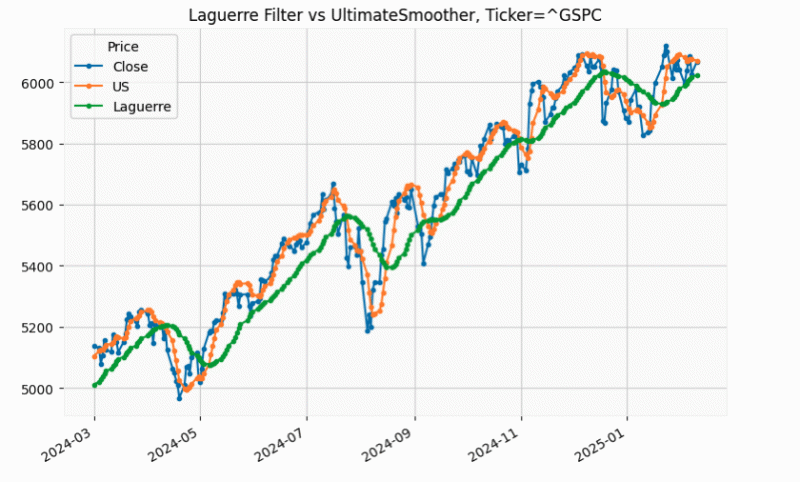 FIGURE 8: PYTHON. This shows an example of both the Laguerre filter and the UltimateSmoother, for comparison, overlaid on a chart of the S&P 500 stock index (GSPC). The indicator calculations used here are based on the length and gamma suggested in John Ehlers’ article in this issue.
ס₪₪₪₪§|(Ξ≥≤≥≤≥≤ΞΞΞΞΞΞΞΞΞΞΞΞΞΞΞΞΞΞΞΞΞΞΞΞΞΞΞΞΞΞΞΞΞΞΞΞΞΞΞΞΞΞΞΞΞΞΞΞΞΞΞΞΞΞΞΞΞΞΞΞΞΞΞΞΞΞΞΞΞΞΞΞΞΞΞΞΞΞΞ>
Figure 9 shows an example of the Laguerre oscillator applied to a chart of the S&P 500 index. The Laguerre oscillator is plotted in the subplot. In the main pane, crossovers of the Laguerre filter and the UltimateSmoother are overlaid on the price candles.
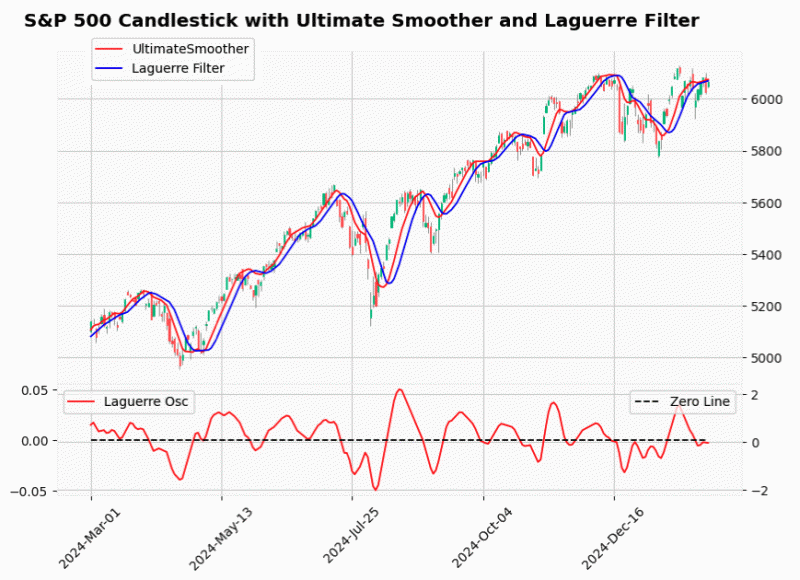 FIGURE 9: PYTHON. This shows an example of the Laguerre oscillator applied to a chart of the S&P 500 index in the subplot. In the main pane, crossovers of the Laguerre filter and the UltimateSmoother are overlaid on price candles.
ס₪₪₪₪§|(Ξ≥≤≥≤≥≤ΞΞΞΞΞΞΞΞΞΞΞΞΞΞΞΞΞΞΞΞΞΞΞΞΞΞΞΞΞΞΞΞΞΞΞΞΞΞΞΞΞΞΞΞΞΞΞΞΞΞΞΞΞΞΞΞΞΞΞΞΞΞΞΞΞΞΞΞΞΞΞΞΞΞΞΞΞΞΞ>
Links: |TradingView|TradeStation|NinjaTrader|MT4|MT5|Python|Excel|
Python: July 2025
Here we present Python code to implement concepts in John Ehlers’ article in this issue, “Laguerre Filters.” The code implements the Laguerre filter, the Laguerre oscillator, and the UltimateSmoother. The indicators are plotted using the MatplotLib and MplFinance Python packages.
Code: Select all
# import required python libraries
%matplotlib inline

import pandas as pd
import numpy as np
import yfinance as yf
import math
import datetime as dt
import matplotlib.pyplot as plt
import mplfinance as mpf

print(yf.__version__)


# Use Yahoo Finance python package to obtain OHLCV data
symbol = '^GSPC'
symbol = 'SPY'
ohlcv = yf.download(symbol, start="1995-01-01", end="2025-04-18", group_by="Ticker", auto_adjust=True)
ohlcv = ohlcv[symbol]


# Python code building block/routines used to implement the Laguerre filter,
# the Laguerre oscillator, and the UltimateSmoother as defined by John Ehlers
# in his article.

def calc_ultimate_smoother(price, period):

    a1 = np.exp(-1.414 * np.pi / period)
    b1 = 2*a1*np.cos(math.radians(1.414 * 180 / period))
    c2 = b1
    c3 = -a1 * a1
    c1 = (1 + c2 - c3)/4

    us_values = []

    for i in range(len(price)):
        if i >= 4:
            us_values.append(
                (1-c1)*price[i] + (2*c1 - c2)*price[i-1] - (c1 + c3)*price[i-2] + c2*us_values[i-1] + c3*us_values[i-2]
            )
        else:
            us_values.append(price[i])

    return us_values


def calc_rms(price):

    length = len(price)
    sum_sq = 0
    for count in range(length):
        sum_sq += price[count] * price[count]
    return np.sqrt(sum_sq / length)


def laguerre_filter(prices, length=40, gama=0.8):
    prices = pd.Series(prices)

    # Apply the Ultimate Smoother to get L0
    L0 = calc_ultimate_smoother(prices, length)

    # Initialize lagged values
    L1 = pd.Series(np.zeros_like(prices), index=prices.index)
    L2 = pd.Series(np.zeros_like(prices), index=prices.index)
    L3 = pd.Series(np.zeros_like(prices), index=prices.index)
    L4 = pd.Series(np.zeros_like(prices), index=prices.index)
    L5 = pd.Series(np.zeros_like(prices), index=prices.index)
    Laguerre = pd.Series(np.zeros_like(prices), index=prices.index)

    for i in range(1, len(prices)):
        L1[i] = -gama * L0[i-1] + L0[i-1] + gama * L1[i-1]
        L2[i] = -gama * L1[i-1] + L1[i-1] + gama * L2[i-1]
        L3[i] = -gama * L2[i-1] + L2[i-1] + gama * L3[i-1]
        L4[i] = -gama * L3[i-1] + L3[i-1] + gama * L4[i-1]
        L5[i] = -gama * L4[i-1] + L4[i-1] + gama * L5[i-1]
        Laguerre[i] = (L0[i] + 4 * L1[i] + 6 * L2[i] + 4 * L3[i] + L5[i]) / 16

    return Laguerre

def laguerre_oscillator(prices, length=40, gama=0.8):
    prices = pd.Series(prices)

    # Apply the Ultimate Smoother to get L0
    L0 = calc_ultimate_smoother(prices, length)

    # Initialize lagged values
    if 1:
        L1 = pd.Series(np.zeros_like(prices), index=prices.index)
        LaguerreOsc = pd.Series(np.zeros_like(prices), index=prices.index)
    else:
        L1 =[0] * len(prices)
        LaguerreOsc = [0] * len(prices)

    for i in range(1, len(prices)):
        L1[i] = -gama * L0[i] + L0[i-1] + gama * L1[i-1]

    rms = L1.rolling(100).apply(calc_rms)
    LaguerreOsc = (L0 - L1)/rms

    return LaguerreOsc


def simple_plot1(df):

    cols = ['Close', 'US', 'Laguerre']
    ax = df[cols].plot(marker='.', grid=True, figsize=(9,6), title=f'Laguerre Filter vs UltimateSmoother, Ticker={symbol}')
    ax.set_xlabel('')

# Below is example usage to run the Laguerre filter and the UltimateSmoother
# indicator calculations using the length and gamma suggested in John Ehlers' article
# with a simple plot presenting price overlaid with indicators.

length = 30
gama = 0.8

df = ohlcv.copy()
df['US'] = calc_ultimate_smoother(df['Close'], period=length)
df['Laguerre'] = laguerre_filter(df['Close'], length=length, gama=gama)
simple_plot1(df['2024-03':'2025-02-10'])

# Example usage to run the Laguerre Filter, Laguerre Oscillator, and
# UltimateSmoother indicator calculations using the length and gamma
# suggested in the article.
#
# The plot is created using MatplotLib and MplFinance python packages.
# This plot presents all indicators on a single plot. Crossovers of the
# Laguerre Filter and UltimateSmoother are overlaid on the price candles.
# The Laguerre Oscillator is plotted as a 2nd subplot.

df = ohlcv.copy()
df['US'] = calc_ultimate_smoother(df['Close'], period=40)
df['Laguerre'] = laguerre_filter(df['Close'], length=40, gama=0.2)
df['LaguerreOsc'] = 100/3*laguerre_oscillator(df['Close'], 20, 0.8)
df
mpf_plot1(df['2024-03':'2025-02-10'])
Figure 8 shows an example of the Laguerre filter and the UltimateSmoother overlaid on a chart of the S&P 500 index (GSPC). The indicator calculations used here are based on the length and gamma suggested in John Ehlers’ article in this issue.
ס₪₪₪₪§|(Ξ≥≤≥≤≥≤ΞΞΞΞΞΞΞΞΞΞΞΞΞΞΞΞΞΞΞΞΞΞΞΞΞΞΞΞΞΞΞΞΞΞΞΞΞΞΞΞΞΞΞΞΞΞΞΞΞΞΞΞΞΞΞΞΞΞΞΞΞΞΞΞΞΞΞΞΞΞΞΞΞΞΞΞΞΞΞ>
Figure 9 shows an example of the Laguerre oscillator applied to a chart of the S&P 500 index. The Laguerre oscillator is plotted in the subplot. In the main pane, crossovers of the Laguerre filter and the UltimateSmoother are overlaid on the price candles.
ס₪₪₪₪§|(Ξ≥≤≥≤≥≤ΞΞΞΞΞΞΞΞΞΞΞΞΞΞΞΞΞΞΞΞΞΞΞΞΞΞΞΞΞΞΞΞΞΞΞΞΞΞΞΞΞΞΞΞΞΞΞΞΞΞΞΞΞΞΞΞΞΞΞΞΞΞΞΞΞΞΞΞΞΞΞΞΞΞΞΞΞΞΞ>
- These users thanked the author Banzai for the post:
- akcodingeye
Re: Python to MT5
9A Synthetic Oscillator
Links: |TradingView|TradeStation|NinjaTrader|MT4|MT5|Python|
Python: April 2026
Provided here is Python code to implement concepts described in John Ehlers’ article in this issue, “A Synthetic Oscillator.”
Readers will also find the following code in a Jupyter notebook on GitHub at: https://github.com/jainraje/TraderTipArticles.
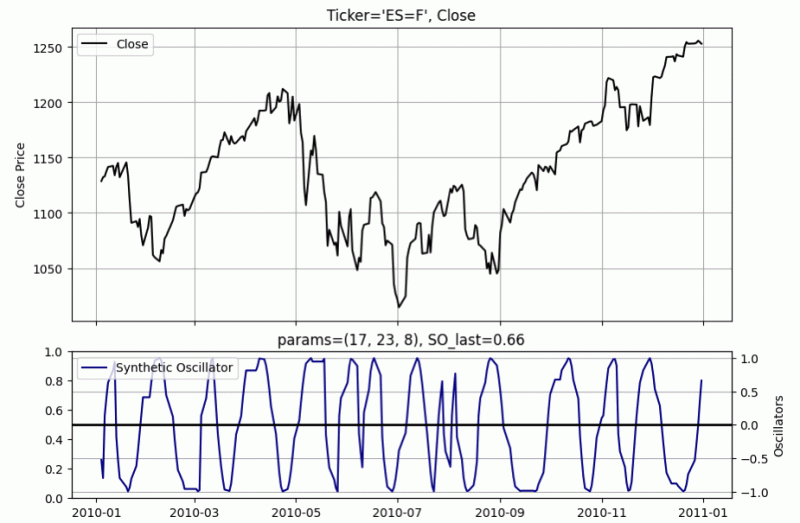 FIGURE 7: PYTHON. An example plot of John Ehlers’ synthetic oscillator is demonstrated on a chart of Emini S&P 500 futures (ES).
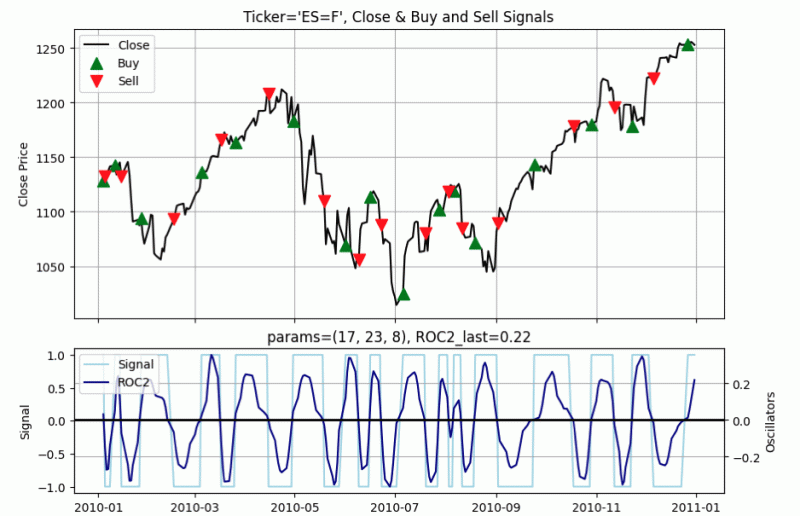 FIGURE 8: PYTHON. Example trading signals display buy and sell points from a demonstration trading system based on the synthetic oscillator.
Links: |TradingView|TradeStation|NinjaTrader|MT4|MT5|Python|
Python: April 2026
Provided here is Python code to implement concepts described in John Ehlers’ article in this issue, “A Synthetic Oscillator.”
Readers will also find the following code in a Jupyter notebook on GitHub at: https://github.com/jainraje/TraderTipArticles.
Code: Select all
"""
Python code to implement concepts in Technical Analysis of Stocks & Commodiities magazine
April 2026 article "A Synthetic Oscillator" by John F Ehlers. This python code is provided
for TraderTips section of the magazine.

Written By:
Rajeev Jain, Feb 2026
jainraje@yahoo,com

All code available in GitHub:
https://github.com/jainraje/TraderTipArticles/

HELPER FUNCTIONS
Not included in Trader Tip article but included in the associated
Jupyter notebook found in the GitHub repo.

Functions called:
- HannFilter
- SuperSmoother
- HighPassFilter
- UltimateSmoother
- RMS

"""

# import required python libraries
import pandas as pd
import numpy as np
import matplotlib.pyplot as plt
import yfinance as yf
import math
print(yf.__version__)

# MAIN CODE FOR ARTICLE

def synthetic_oscillator(close, params=(15, 25, 4)):
    """
    Synthetic Oscillator function (Python version compatible with list-based helper functions)
    close       : list of closing prices
    lower_bound : Lower bound of cycle period
    upper_bound : Upper bound of cycle period
    length      : smoothing length (not directly used here)
    returns: list of oscillator values

    """

    lower_bound = params[0]
    upper_bound = params[1]
    length = params[2]

    n = len(close)
    synth = [0] * n
    phase = [0] * n

    # Step 1: Price preprocessing with Hann window
    price = hann_lowpass(close, length=12)

    # Step 2: Real component (bandpass filtered & normalized)
    hp = high_pass(price, upper_bound)
    lp = super_smoother(hp, lower_bound)
    rms_lp = rms(lp, 100)
    real = [lp[i] / rms_lp[i] if rms_lp[i] != 0 else 0 for i in range(n)]

    # Step 3: Imaginary component (rate of change normalized)
    roc = [0] * n
    for i in range(1, n):
        roc[i] = real[i] - real[i-1]
    qrms = rms(roc, 100)
    imag = [roc[i] / qrms[i] if qrms[i] != 0 else 0 for i in range(n)]

    # Step 4: Dominant cycle period (DC) calculation
    dc = [0] * n
    for i in range(1, n):
        denom = (real[i] - real[i-1]) * imag[i] - (imag[i] - imag[i-1]) * real[i]
        if denom != 0:
            dc_val = 2 * math.pi * (real[i]**2 + imag[i]**2) / denom
            # limit DC to lower and upper bounds
            dc[i] = max(lower_bound, min(dc_val, upper_bound))
        else:
            dc[i] = lower_bound

    # Step 5: Midpoint cycle
    mid = math.sqrt(lower_bound * upper_bound)

    # Step 6: Bandpass filter at average dominant cycle
    hp2 = high_pass(close, mid)
    bp = ultimate_smoother(hp2, mid)

    # Step 7: Phase accumulation
    for i in range(1, n):
        phase[i] = phase[i-1] + 360 / dc[i]

        # Reset phase at BP zero crossings
        if bp[i-1] < 0 <= bp[i]:
            phase[i] = 180 / dc[i]
        elif bp[i-1] > 0 >= bp[i]:
            phase[i] = 180 + 180 / dc[i]

    # Step 8: Synthetic oscillator = sine of cumulative phase
    synth = [math.sin(math.radians(p)) for p in phase]

    # Step 9: Remove reset glitch if continuity falls in same quadrant
    for i in range(1, n):
        if 0 < phase[i] < 90 and synth[i] < synth[i-1]:
            synth[i] = synth[i-1]
        elif 180 < phase[i] < 270 and synth[i] > synth[i-1]:
            synth[i] = synth[i-1]

    return synth

def plot_trading_signals(df, params, plot_so_ena=False, plot_roc2_ena=True, plot_buy_sell_ena=True):

    fig, (ax1, ax2) = plt.subplots(
        2, 1,
        figsize=(9, 6),
        sharex=True,
        constrained_layout=True,
        gridspec_kw={'height_ratios': [2, 1]}
    )

    # --- Price subplot ---
    ax1.plot(df.index, df['Close'], label='Close', color='black')
    ax1.set_ylabel('Close Price')

    if plot_buy_sell_ena:
        ax1.set_title(f"Ticker='{symbol}', Close & Buy and Sell Signals")
    else:
        ax1.set_title(f"Ticker='{symbol}', Close")
    ax1.grid(True)

    if plot_buy_sell_ena:
        # --- Plot Buy/Sell markers only on transitions ---
        if 'Signal' in df.columns:
            buy_idx = df[(df['Signal'] == 1) & (df['Signal'].shift(1) != 1)]
            sell_idx = df[(df['Signal'] == -1) & (df['Signal'].shift(1) != -1)]

            ax1.scatter(
                buy_idx.index,
                buy_idx['Close'],
                marker='^',
                color='green',
                s=100,
                label='Buy',
                zorder=3
            )

            ax1.scatter(
                sell_idx.index,
                sell_idx['Close'],
                marker='v',
                color='red',
                s=100,
                label='Sell',
                zorder=3
            )

    ax1.legend(loc='upper left')

    # --- Oscillator subplot ---
    ax2_left = ax2
    ax2_right = ax2.twinx()


    title_text = f"params={params}"

    if plot_so_ena and 'SO' in df.columns:
        ax2_right.plot(df.index, df['SO'], label='Synthetic Oscillator', color='darkblue')
        title_text += f", SO_last={df['SO'].iloc[-1]:.2f}"

    if plot_roc2_ena and 'ROC2' in df.columns:
        ax2_right.plot(df.index, df['ROC2'], label='ROC2', color='darkblue')
        title_text += f", ROC2_last={df['ROC2'].iloc[-1]:.2f}"
        if 'Signal' in df.columns:
            ax2_left.plot(df.index, df['Signal'], label='Signal', color='lightblue')
            ax2_left.set_ylabel('Signal')

    ax2_right.set_ylabel('Oscillators')
    ax2_right.axhline(0, color='black', linewidth=2)
    ax2_right.set_title(title_text)
    ax2_right.grid(True)

    lines_left, labels_left = ax2_left.get_legend_handles_labels()
    lines_right, labels_right = ax2_right.get_legend_handles_labels()
    ax2_right.legend(lines_left + lines_right, labels_left + labels_right, loc='upper left')

    plt.xticks(rotation=45)
    plt.show()


# The following function contains all indicator calculations and trading logic.
def calc_trading_strategy(ohlcv, params=None):

    if params is None:
        params=(17, 23, 8)

    length = params[2]

    df = ohlcv.copy()
    # synthetic oscillator indicator (aka SO)
    df['SO'] = synthetic_oscillator(df['Close'], params)

    # run SO output through Hann lowpass filter and perform ROC
    df['SO2'] = hann_lowpass(df['SO'], params[2])
    df['ROC2'] = df['SO2'] - df['SO2'].shift()

    # buy logic (ROC2 cross above 0)
    cond_buy = (df['ROC2'] > 0) & (df['ROC2'].shift() < 0)
    df['Signal'] = np.where(cond_buy, 1, np.nan)

    # sell logic (ROC2 cross below 0)
    cond_sell = (df['ROC2'] < 0) & (df['ROC2'].shift() > 0)
    df['Signal'] = np.where(cond_sell, -1, df['Signal'])
    df['Signal'] = df['Signal'].fillna(method='ffill')

    # add BUY and SELL alerts to dataframe
    df['Alert'] = np.where((df['Signal']==1) & (df['Signal'].shift()== -1), 'BUY', '')
    df['Alert'] = np.where((df['Signal']==-1) & (df['Signal'].shift()== 1), 'SELL', df['Alert'])

    return df


# EXAMPLE USAGE

# download price data from Yahoo Finance
symbol = '^GSPC'
symbol = 'ES=F'
ohlcv = yf.download(
    symbol,
    start="2000-01-01",
    end="2026-02-12",
    group_by="Ticker",
    auto_adjust=True,
    progress=False,
)
ohlcv = ohlcv[symbol]


# Call trading strategy and plotting functions.
# Use slicing technique to set plot start and end timeframes.
# Set arguments on plotting function to enable or disable
# desired indicator plots

# example usage below shows closing price for instrument in top subplot
# and Synthetic Oscillator in the bottom subplot

# --- Set Indicator Parameters as desired ---
lower_bound = 17
upper_bound = 23
length = 8
params=(lower_bound, upper_bound, length)
df = calc_trading_strategy(ohlcv, params)
plot_trading_signals(df['2010':'2010'], params, plot_so_ena=True, plot_roc2_ena=False, plot_buy_sell_ena=False)


# Call trading strategy and plotting functions.
# Use slicing technique to set plot start and end timeframes.
# Note the Signal line (light blue) generates the buy and sell
# signals as the ROC2 indicator goes above and below zero.
# Inspect plot for buy or sell signal.

# --- Set Indicator Parameters as desired ---
lower_bound = 17
upper_bound = 23
length = 8

params=(lower_bound, upper_bound, length)
df = calc_trading_strategy(ohlcv, params)
plot_trading_signals(df['2010':'2010'], params, plot_so_ena=False, plot_roc2_ena=True, plot_buy_sell_ena=True)


# Inspect resulting dataframe for a BUY or SELL Alert
# example below shows most recent last 12 days
df.tail(12)


# Filter to inspect all BUY and SELL Alerts
# Use slicing techniques to zero in on specific time frames
cond = df['Alert'] != ''
df[cond]['2025':'2025'].head(10)
Re: Python to MT5
10The AutoTune Filter
Links: |TradingView|TradeStation|NinjaTrader|MT4|MT5|Python|
Python: May 2026
Provided here is Python code to implement concepts described in John Ehlers’ article in this issue, “The AutoTune Filter.”
An example plot of the AutoTune indicator is shown in Figure 8.
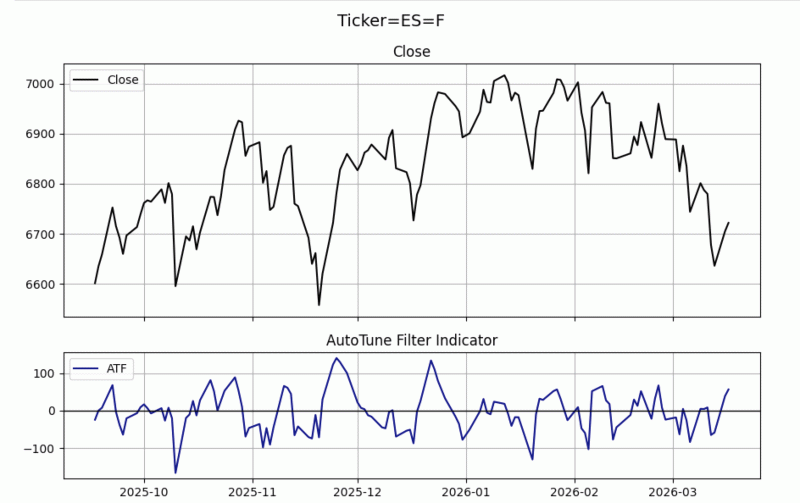 Figure 8: PYTHON. An example plot of John Ehlers’ AutoTune indicator is demonstrated on a chart of emini S&P 500 futures (ES).
Links: |TradingView|TradeStation|NinjaTrader|MT4|MT5|Python|
Python: May 2026
Provided here is Python code to implement concepts described in John Ehlers’ article in this issue, “The AutoTune Filter.”
Code: Select all
"""

Python code to implement concepts in Technical Analysis of Stocks & Commodiities magazine
May 2026 article "The AutoTune Filter" by John F Ehlers. This python code is provided
for TraderTips section of the magazine.

Written By:
Rajeev Jain, Mar 2026
jainraje@yahoo,com

All code available in GitHub:
https://github.com/jainraje/TraderTipArticles/

"""


# import required python libraries
import pandas as pd
import numpy as np
import matplotlib.pyplot as plt
import yfinance as yf
import math

print(yf.__version__)


# HELPER FUNCTIONS
def highpass_filter(price, period):
    price = np.asarray(price, dtype=float)
    n = len(price)
    hp = np.zeros(n, dtype=float)

    Q  = math.exp(-1.414 * math.pi / period)
    c1 = 2 * Q * math.cos(1.414 * math.pi / period)
    c2 = Q * Q
    a0 = (1 + c1 + c2) / 4.0

    for t in range(2, n):
        hp[t] = (
            a0 * (price[t] - 2 * price[t-1] + price[t-2]) +
            c1 * hp[t-1] -
            c2 * hp[t-2]
        )
    return hp


def bandpass_single_step(close, bp_prev1, bp_prev2, period, bandwidth):

    if period <= 0:
        return 0.0

    L1 = math.cos(2 * math.pi / period)
    G1 = math.cos(bandwidth * 2 * math.pi / period)
    S1 = 1.0 / G1 - math.sqrt(1.0 / (G1 * G1) - 1.0)

    return (
        0.5 * (1.0 - S1) * (close[0] - close[2]) +
        L1 * (1.0 + S1) * bp_prev1 -
        S1 * bp_prev2
    )

# Retrieve price data via Yahoo Finance

symbol = '^GSPC'
symbol = 'ES=F'
ohlcv = yf.download(
    symbol,
    start="2000-01-01",
    end="2026-03-18",
    group_by="Ticker",
    auto_adjust=True,
    progress=False,
)
ohlcv = ohlcv.stack('Ticker', future_stack=True).reset_index().set_index('Date')
ohlcv


# inspect closing price line plot
ax = ohlcv['Close'].plot(grid=True, title=f'Ticker={symbol}')


# AutoTune Indicator and AutoTune Plot functions

def autotune_indicator(close, window=20, bp_bandwidth=0.25):

    close = np.asarray(close, dtype=float)
    n = len(close)

    filt = highpass_filter(close, window)
    mincorr = np.ones(n, dtype=float)
    dc = np.zeros(n, dtype=float)
    bp = np.zeros(n, dtype=float)

    for t in range(window, n):
        # correlation window: last `window` filt values ending at t
        x = filt[t-window+1 : t+1]  # length = window

        # For each lag = 1..window, compute correlation with lagged version
        best_corr = 1.0
        best_lag = 1

        for lag in range(1, window + 1):
            # y is x shifted back by `lag` bars in the underlying filt series
            idx_start = t - window + 1 - lag
            idx_end   = t + 1 - lag

            if idx_start < 0:
                continue

            y = filt[idx_start:idx_end]
            if len(y) != window:
                continue

            Sx = x.sum()
            Sy = y.sum()
            Sxx = np.dot(x, x)
            Syy = np.dot(y, y)
            Sxy = np.dot(x, y)

            denom_x = window * Sxx - Sx * Sx
            denom_y = window * Syy - Sy * Sy
            if denom_x <= 0 or denom_y <= 0:
                continue

            corr = (window * Sxy - Sx * Sy) / math.sqrt(denom_x * denom_y)
            if corr < best_corr:
                best_corr = corr
                best_lag = lag

        # Dominant cycle
        local_dc = 2.0 * best_lag
        if t > 0:
            if local_dc > dc[t-1] + 2:
                local_dc = dc[t-1] + 2
            if local_dc < dc[t-1] - 2:
                local_dc = dc[t-1] - 2

        mincorr[t] = best_corr
        dc[t] = local_dc

        # Bandpass at this bar (needs t >= 2)
        if t >= 2 and dc[t] > 0:
            bp[t] = bandpass_single_step(
                close[t-2:t+1], bp[t-1], bp[t-2], dc[t], bp_bandwidth
            )

    return filt, mincorr, dc, bp


def plot_autotune_filter(df):

    import matplotlib.pyplot as plt

    fig, (ax1, ax2) = plt.subplots(
        2, 1, figsize=(9,6), sharex=True,
        gridspec_kw={"height_ratios": [2, 1]}
    )

    # Overall title
    fig.suptitle(f"Ticker={symbol}", fontsize=14)

    # Top: Close in black
    ax1.plot(df.index, df["Close"], color="black", label="Close")
    ax1.set_title("Close")
    ax1.legend(loc="upper left")
    ax1.grid(True)

    # Bottom: Filt in dark blue
    ax2.plot(df.index, df["Filt"], color="darkblue", label="ATF")
    ax2.axhline(y=0, color="black", linewidth=1)  # horizontal line at zero
    ax2.set_title("AutoTune Filter Indicator")
    ax2.legend(loc="upper left")
    ax2.grid(True)

    plt.tight_layout()
    plt.show()


# Run the indicator function and plot results
# using slicing techniques to plot last 126 days (aka 6M)

df = ohlcv.copy()
df["Filt"], df["MinCorr"], df["DC"], df["BP"] = autotune_indicator(df['Close'], window=20, bp_bandwidth=0.25)
df


plot_autotune_filter(df[-126:])

 Kinetic Conduit v3.2